
achbmapihopafpcmbfcknmopheeepedb
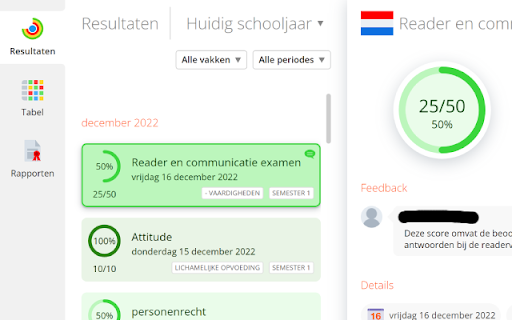
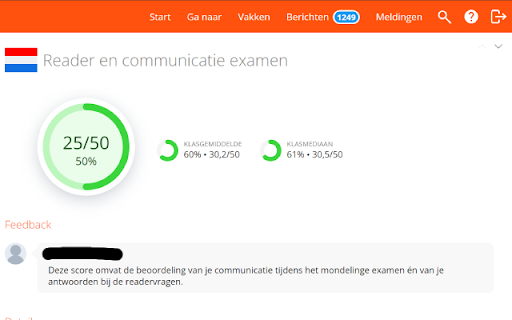


A chrome extension that will make your scores appear better Turns your scores back into green even when you don't have above 65% on a test

Smartschool Premium
Donkere premium modus en startpagina overlay voor Smartschool. Met Smartschool Premium geef je jouw digitale leeromgeving een volledige Upgrade. Deze extensie is speciaal ontworpen voor leerlingen/studenten die op zoek zijn naar een minder saaie Smartschool en een modern design.

Smartschool++
Enhance your Smartschool experience with themes and more Patch notes: 6.0.0 *More detailed patch notes are on our official site - Added many extra themes, and categories - Save multiple custom themes - Auto generate a theme based on an image - Added Glass style 5.0.0 *More detailed patch notes are on our official site -New settings window with much more customization -Many many bug fixes and UI upgrades -Pong++ 4.0.0 *More detailed patch notes are on our official site -Introduced a new Widget system for the homepage -Breakout++ -Assignments widget 3.0.0 -Global Chat Beta -Plant -Splashtekst -Bug fixes and UI changes -Better Weather overlay -Improved settings menu 2.0.0 -Flappy Bird++ -Minor bugs fixes -Planner on the home screen -Weather rework -Improved Quick Menu -More Easter eggs -Some buttons have icons -The title of the tab now showing relevant info 1.3.0 -DISCORD SERVER! -Added "Custom Theme". -Fixed many bugs and improved many things. -Most major visual disturbances should be removed now. -Work in progress Quick-Menu updates. -Preparations for next update "The Fun Update" / "Easter Egg Update" -A nice new look for "planner". 1.2.0 -New themes: "Sahara Oasis", "Fluorescent Galaxy", "Off White", "Ruby Eclipse", "Dark Mocha". -Renamed all themes and some minor updates to some themes. -Added Snake++ game (disabled by default). -Minor update to DeLijn and weather application. -Minor bugfixes and visual bugfixes. -Minor login app rework. 1.1.0 -Major update to DeLijn application. -Login problems because of Smartschool ++ for many users now resolved. -Minor bugfixes and visual bugfixes. ==ROADMAP== Major code-cleanup for performance.*

Smartschool Plus
Not compatible with the newer Smartschool Foto's module. - Adds a "Download original" button under the main photo when viewing a photo gallery. Use this button to download the main photo in its original quality. - Adds a "Make album zip" button under every photo album, allowing you to download an entire album as a zip file. All photo's in this zip will be original quality.

GradeFlow
Improve SmartSchool with grade overviews, weighted averages, period filters, chat, and arcade games. GradeFlow puts a full grade overview panel right inside SmartSchool. Click the GradeFlow button in the sidebar and all your results show up in a clean, interactive table. GRADE OVERVIEW • All your grades across every period, sorted by subject • Color-coded cells so you can immediately spot weak and strong results • Hover any grade to see the score, contribution, and weighted details • Sticky subject column with SmartSchool's own subject icons • Bottom bar with your overall percentage, total points, subject count, best subject, and a progress bar DASHBOARD TOOLS • Overview, trends, planner, class comparison, attendance, decision help, and export tabs • Trend view shows whether each subject is improving, stable, or slipping • Study/work planner lets you add your own tasks and get one reminder at the start time • SmartSchool planner and attendance loaders show upcoming work, absences, and late arrivals when SmartSchool exposes that data • Decision help highlights safe, watchlist, and critical subjects with approximate next-score targets • Export grades to CSV or a print-friendly PDF report WEIGHTING METHODS • Points - plain scored/max percentage • Hour-weighted - set lesson hours per subject and your average gets weighted accordingly • Formula - define your own period groups with custom weights, for example 40% Semester 1 + 60% Semester 2, then drag to reorder PERIODS • Auto-detects all your SmartSchool periods, including semesters, trimesters, exams, and more • Switch between individual periods or view everything combined in Alle • Duplicates across periods are handled automatically BEST SUBJECT • Shows your top subject by grade percentage or by hour-weighted value APPEARANCE AND LANGUAGE • Dark and light theme with anti-flash loading • Smartschool++ support: when Smartschool++ is active, its themes, glass mode, layout, popup styling, chat, games, and update modal take over cleanly • Dutch, English, and French • Full custom language editor: change any string you want, import/export as JSON • Choose your decimal separator and how many decimal places to show SMARTSCHOOL HOMEPAGE • Native GradeFlow homepage summary with average, weakest subject, subject count, and risk subjects • Summary stays in the main Smartschool++ news area when Smartschool++ rewrites the homepage layout • Quick shortcut back to the GradeFlow panel SUBJECT ICONS • Pulled straight from SmartSchool's own icon set • Click any icon in the table to swap it for an emoji • 50+ built-in keyword rules, fully editable, with a reset option PERSONALISATION • Change your display name on SmartSchool • Replace your profile picture with any image, using drag and drop or a file picker • Fake message counter from 0 to 9999 • Fake notification counter from 0 to 9999 • Fake news counter from 0 to 9999 HELP • Built-in help panel explaining every feature and shortcut • Links to GitHub and the Chrome Web Store review page ARCADE - 11 HIDDEN GAMES (press F8 or Shift+F8) • GradeStack - Tetris with grade-themed pieces • GradeSnake - snake game with levels, good grades make you grow, bad ones shrink you • Grade 2048 - merge weak grades until you hit 20/20 • GradeSweeper - minesweeper where the mines are failing grades, with 3 difficulties • GradeMemory - flip and match grade card pairs, with easy, medium, and hard modes • GradeShooter - bubble shooter with grade-colored bubbles, clear mode, and endless mode • GradeBreakout - smash grade bricks with a paddle and ball • GradePong - play pong against an AI with grade-powered effects • GradeFlappy - fly through pipe gaps and dodge bad grades • GradeRunner - endless runner with jumps, slides, pickups, and grade obstacles • GradeTower - micro tower defense with difficulty levels and grade-unlocked towers All games use your actual grades when available, track your personal best, and have animated previews in the menu. PEER-TO-PEER CHAT (press F7) • Opt-in overlay chat with other GradeFlow users, fully off by default • Direct browser-to-browser over WebRTC, no server, no account • Host generates one invite link per friend, with the room code baked in • You share each invite link yourself through Discord, messages, or any other channel • Each invite slot doubles as a kickable seat once someone connects • Survives page navigations on SmartSchool so your chat stays alive while you browse • Rooms cap at 8 people: host + 7 • Messages are kept in memory only, max 60, and wiped when the room closes. GradeFlow never writes chat to disk, but other people in the room can copy or save what you send. • Warning screen on first use: your LAN/public IP is visible to every peer, there is no moderation, and any peer can pick any nickname and send anything. Only chat with people you actually know. • Fully translated in Dutch, English, and French KEYBOARD SHORTCUTS • F6 - open GradeFlow • F7 - open/close the chat overlay • F8 or Shift+F8 - open/close the arcade • Esc - close settings, arcade, or current game • P - pause game • R - restart game • Arrow keys / WASD - game controls • Z - rotate in GradeStack
