
abmlahmommonnmpmjadpcodmfhkpllhg
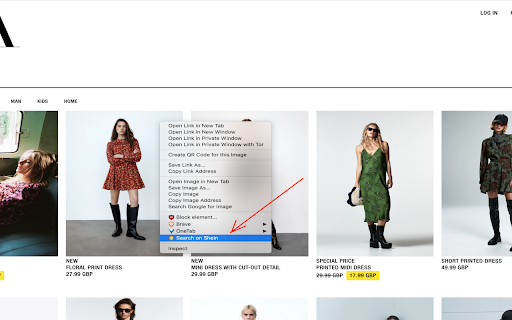

Simple extension to find Shein products by image or by code. This simple tool will help you to easily search on Shein by image. To search by image you just have to right click on any picture you find online (for example on ASOS, on Zalando, AliExpress, Zara…) and click on “Search on Shein”. You can also upload the image to our website and get the results instantly. Now you can easily find cloths on Shein by image. If you want to search other stores such as ASOS, AliExpress,... and compare the results, go over to the website.

Shein Images Downloader
Scrape and download high-resolution images of Shein product listings in bulk or one by one from any listing with just a click. Shein Images Downloader This Chrome extension allows you to easily download high-resolution images of products listed on Shein.com. With one click, you can download all the images of a product. You have the option to download images individually or zip them together for bulk download. No coding knowledge is required. This handy extension makes grabbing product images from Shein a breeze. Whether you want to use the images for design inspiration, print them, or simply archive your favorites, the extension helps you gather high-quality product photos with ease. Download what you need and skip the hassle. This useful tool was created for casual shoppers and power users alike. Bring Shein images to your desktop in just one click - simple but powerful. What Shein Images Downloader can do for me? This is a Chrome Extension that allows users to scrape and download product images from Shein listings easily. With just one click, users can download all images for a particular product, making it a convenient tool for shop owners or anyone who needs to quickly grab product images from the site. How to download all the listing images from a given Shein product? Scraping and downloading product images can be done easily with our tool, without any need for coding. Simply follow these steps: - Open any product on Shein.com. - Click the “download icon” on the right top of the product listings images. - All the product listings images should display on the popup window. You can download images individually or as a bundled zip file. Data Privacy Your data stays on your device and is not stored or transmitted to our servers. We prioritize keeping your information secure and confidential. Disclaimer This is an independent project developed by ExtensionBox and has no relationship to Shein Inc.

AiPrice(AliPrice) Search by image for Shein
AiPrice(AliPrice) - Shein Image Search is a professional Shein product research and price tracking tool designed for eCommerce sellers. The extension integrates Shein image search, Shein price tracking, cross-platform product sourcing, and quick access to shopping pages, helping sellers efficiently perform competitor analysis, price monitoring, and supply chain sourcing. Main Features: 1. Shein Image Search Search for identical or similar products with one click using images. The tool supports searching across major eCommerce platforms such as Shein, 1688, and Taobao to find matching products. It helps sellers quickly complete Shein trending product research, similar product comparison, supplier discovery, and cross-platform product sourcing, greatly improving product research efficiency. 2. Shein Price Tracker View the 3-month or 6-month price history of Shein products, with clear price trend charts. This helps sellers identify real discounts, promotional campaigns, and price trends, making it ideal for price monitoring, competitor analysis, profit calculation, and market trend research. 3. Shein Quick Access Provides quick shortcuts to Shopping Cart, Orders, and Wishlist, allowing one-click access to important Shein pages and improving daily workflow efficiency. Ideal for eCommerce sellers who frequently browse products, manage orders, and track saved items. 4. Image Download & Media Management Supports batch downloading of product videos, main images, SKU images, and description images from platforms such as Shein, 1688, and Amazon, and allows exporting image links. Images can also be translated and edited online on the AiPrice(AliPrice) website, making it easier for product listing creation, listing optimization, and social media marketing. Shein is a trademark of Shein Inc. This extension was developed by AiPrice(AliPrice).com and is not an official extension of Shein. If you have any questions, welcome to contact us: https://www.aiprice.com/information/index/page/contact By installing the AiPrice(AliPrice) extension, you accept the terms of the "AiPrice(AliPrice) Terms of Service" and allow the extension to redirect to affiliate program links, including Shein and other programs. AiPrice(AliPrice) Terms of Service - https://www.aiprice.com/information/index/page/term_of_use

Shein Reviews Extractor - Scrape Data to CSV
Unlock invaluable Shein product insights. Extract user reviews, ratings, and AI-powered summaries effortlessly. Shein Reviews Extractor is a browser extension that empowers you to harness the collective wisdom of Shein's vast user community. With just a few clicks, you can effortlessly extract and analyze product reviews, unlocking invaluable insights to inform your purchasing decisions. Seamless Review Extraction This powerful extension allows you to extract reviews for any product on Shein.com with unparalleled ease. Simply navigate to the desired product page, click the "Download Reviews" button, and let the extension work its magic. Within moments, you'll have access to a comprehensive dataset, including comment IDs, user names, ratings, comments, comment times, comment images, like numbers, goods IDs, order times, sizes, size statuses, colors, color IDs, SPUs, and scraping timestamps. Flexible Data Export Once the review extraction process is complete, you can effortlessly export the data in your preferred format – CSV, JSON, or XLSX (Excel) – for seamless integration with your existing workflows. Whether you're conducting in-depth analysis, generating reports, or sharing insights with colleagues, this extension ensures you have the data at your fingertips. AI-Powered Review Summary Elevate your review analysis with the cutting-edge AI Review Summary feature. With a single click, you can unlock a comprehensive summary of user reviews, including Advantages, Disadvantages, Improvement Suggestions, and a concise "To Buy or Not to Buy" recommendation. This powerful ChatGPT-driven analysis empowers you to quickly grasp the essence of user feedback, saving you valuable time and effort. Instant Results, Unparalleled Convenience The Shein Reviews Extractor extension is designed to deliver results with lightning-fast speed. As soon as you initiate the extraction process, the extension begins working tirelessly to gather the requested data. The duration of the extraction process varies based on the amount of information you need to retrieve, ensuring you receive comprehensive and up-to-date insights without unnecessary delays. Unlock the true potential of user reviews and elevate your decision-making process with Shein Reviews Extractor. Download this powerful extension today and experience the convenience of effortless review extraction and GPT-driven analysis. Data Privacy The data you work with remains confined to your local machine and does not traverse our servers at any point. Disclaimer This extension is an independently developed product by ExtensionsBox and has no association with Amazon, Inc.

THunt image search
A powerful thunt product image search tool that supports Google, Bing, Baidu, Yandex, AliExpress and other search methods. THunt Image Search is a browser extension that lets you search for any product image on the web and find similar products across different platforms. You can compare prices, optimize your product details, or discover lower-priced alternatives with ease. The extension helps sellers and buyers find the best deals and products on the web, and assists in the identification of counterfeit or fraudulent items. THunt Image Search is also popular among designers, helping artists explore how their work is used and shared on the web, while shoppers find it valuable for discovering new styles and trends. This extension adds three items to the context menu of your browser: ➡️1. Google search ➡️2. Bing search ➡️3. Baidu search ➡️4. Yandex search ➡️5. Aliexpress search 👋 👋 HOW TO USE IT? Just install it onto your Chrome browser, visit website —————————————————————————————————— 1. When you find the product image you want to search for, right-click to display the context menu. 2. Select a search method and click to trigger to jump. 3. In the newly expanded page, you can find many similar products to products. You can optimize your own products or find the lowest-priced products by comparing prices and other elements. —————————————————————————————————— For more products analysis, please check https://thunt.ai
