
ablnljkgfddcblnejlnacgeamgbjfkko


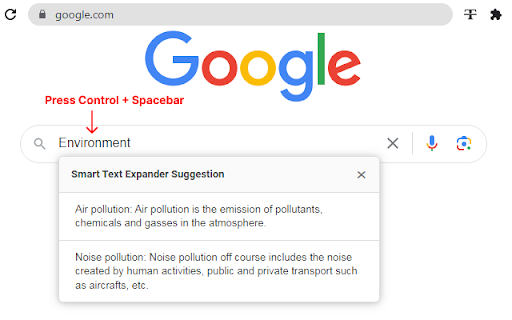


Expand your short text with long descriptive text quickly with help of this Smart Text Expander extension Smart text expander is a tool that allows users to quickly insert long text by typing abbreviated versions of the text. By using a text expander, users can save time and effort by avoiding the need to type out the same phrases or blocks of text repeatedly. After entering sort text Press Hot key and it will be converted to large description which you set for that sort text. Text expander can be customized to include the user's own predefined texts and settings. Text expander are useful for a variety of purposes, such as generating filler text for documents or creating content for social media posts. ★★★ Ctrl + Space-bar ★★★ is default hot key. to trigger the expansion of abbreviated text into the full version. Save your time to type large description by pressing hot key after inserting relative sort-text. Example brb => Be right back. signature => John Smith, Co-Founder at Development busy => Currently busy with few meetings, will back to you soon. FEATURES - Create multiple snippets - Create multiple descriptive text to single sort-text - Works in most of all type of text box including iframe - Import/Export your saved settings. - Flexible Automation: A new setting combines "On Keypress" and "Typing" for smarter auto-options. - Auto Text Replacement: Get faster typing with instant text replacement while you type. All replacements can be customized in the settings. - Smart Text Clipper: Now you can select text on any webpage and quickly add it to your Smart Text library. - Improvements: Fixed various bugs and improved overall performance. Now, with just a simple keypress or while typing, you'll experience suggestion integration. When you select "on key press," a quick Ctrl+Spacebar keystroke at the top will effortlessly trigger suggestions. And if you prefer the "on typing" mode, suggestions will elegantly appear as you type. Creating folders and files is now easier. You can duplicate both folders and files with just one click and sorting options according to folder name, file name, and date. Also, you can delete multiple selected folders and text entries in one go.

Free Auto Text Expander for Google Chrome™
Create custom keyboard shortcuts to expand and replace text as you type! Want to save time daily when you are typing on the computer? Use Free Auto Text Expander for Google Chrome™ which allows you to type in letter combinations like "LOL" and have "Laugh Out Loud" show up on the computer screen instead. Think of how many sentences/phrases which you type daily over and over again. Our software extension can help save time by saving the keystrokes needed when you have to type in the same phrase over and over. Please note to use this extension features, you HAVE to click on the extension icon to activate the "auto text expander" feature on the website you are on. This is to prevent our script from running automatically on all websites you visit. This protects your privacy and ensures your browsing history/keyboard typing history etc is NOT sent to external third party websites. Other competitor text expander software scripts "run on all websites" and you have to trust them to ensure they are not sending this information back to their servers etc. For our extension, it is impossible for us to track your keystrokes because the software only works when you click on the extension icon. To add text expander text - please right click on the extension icon and choose options. You can add as many text shortcuts as you want inside the options page of this extension. Due to popular demand to make this software more user friendly, we've added the permission "Works on all websites". You do NOT need to click on the extension icon for the auto text expander feature to work on every webpage you browse. Please note our software does NOT store/capture any of your website visits etc and the only reason we ask for the "runs on all websites" permissions is because we had a lot of users email us asking for a easier version where they did not have to click on the extension icon to use the auto text expansion feature. Fixed a bug for duplicate copying on some websites Add export/import feature via json files for exporting/importing your own text shortcuts Add %clip% command in auto text so that you can automatically paste text you have from the clipboard. Please note due to the new %clip% feature, our extension will require the clipboard permission. None of the text you copy & paste etc is ever sent to our servers, the data is all processed directly on your own computer when you use the %clip% feature. Localization for options page to be multi-language :heavy_check_mark: You can add in your own custom phrases/text you want to expand. :heavy_check_mark: 100% Free Software :heavy_check_mark: Simple and Easy to Use Use an auto text expander software today! Save time typing in your everyday tasks once you install Free Auto Text Expander for Google Chrome™. Disclaimer: Please note this extension is NOT made by Google and is made by an independent development team. All copyrights belong to their respective owners. Google doesn’t endorse or sponsor this Chrome extension. Free Auto Text Expander for Google Chrome™ is not owned by, is not licensed by and is not a subsidiary of Google Inc.

Text Expander
Use Text Expander – a magical text expander to expand text instantly with paste shortcut and save typing time Text Expander is a modern extension designed to help you type faster, work smarter, and automate repetitive typing tasks. This text expander chrome solution is perfect for daily communication, professional workflows, and anyone who wants to expand content with a simple paste shortcut. As an application , it works directly in your browser and adapts to any website or web app 💡 With this magical text expander, you can create, snippets, reuse content templates, and turn long responses into short shortcut answers. The extension is ideal for emails, chats, customer support, coding comments, and social media. If you are looking for a some free option, this tool gives you essential features without complexity 📌 Why choose this text expander chrome extension ➤ lightning-fast expand content using a paste shortcut key ➤ smart auto logic for natural typing ➤ clean and simple app interface ➤ works as a web tool on any site ➤ easy download and instant setup This free text expander allows you to save phrases as text snippets and reuse them anywhere. You can store greetings, signatures, answers, and templates as a content snippet and insert them with a clipboard shortcut. The snippet manager keeps all your snippets organized and searchable 📍 Key features of the text expander create unlimited snippets for daily use expand content with custom paste shortcut save as shortcut for emails and forms Advanced usage scenarios 1️⃣ customer support teams use text expander chrome for fast replies 2️⃣ freelancers rely on templates and message template workflows 3️⃣ developers store code comments as snippets 4️⃣ marketers reuse google rich content 5️⃣ sales teams speed up answers with shortcut answer logic As a magic text expander, it reduces typing errors and boosts consistency. The auto extender helps you focus on content instead of repetition. Compared to tools like another chrome extensions, this app solution stays lightweight and easy to use ⚡ Benefits you will notice immediately less typing and fewer mistakes faster responses with paste shortcut better productivity with chrome expander smooth workflow with text expander extension Q: is this a free chrome extension A: yes, it is a free tool with core features Managing text snippets made simple ▸ create a snippet once and reuse it ▸ organize it by categories ▸ edit it anytime ▸ trigger snippets with paste shortcut key ▸ sync your workflow inside the browser This chrome extension text snippets tool also helps you standardize communication. From content template replies to long-form emails, everything can be saved as shortcut and reused instantly. With clipboard shortcut support, you never lose speed 🚀 Who should use this text expander chrome extension • remote workers and teams • customer support agents • content creators and marketers • developers and testers • anyone who types the same writings daily If you need a reliable text expander download that works instantly, this text expander chrome solution is built for you. It combines the power of same kind of apps with the simplicity of a modern solution, making it a strong alternative to complex tools. Start using Text Expander today and experience how a magical tool, smart features, and a powerful paste shortcut can transform your daily typing workflow.

FlyMSG: AI Writer, Text Expander, & Grammar Checker
AI text expander, writing assistant & grammar checker for LinkedIn, email, and any website. Save 1+ hour every day. 𝐓𝐲𝐩𝐞 𝐋𝐞𝐬𝐬. 𝐃𝐨 𝐌𝐨𝐫𝐞. FlyMSG is the auto text expander and AI writing assistant trusted by 25,000+ professionals across 12,000+ companies. Save 1+ hour every day by turning short keyboard shortcuts into full messages, fixing grammar in real time, and writing better LinkedIn comments and posts with AI — all from one extension that works on every website you use. Save 30+ hours every month. Type 3.2 billion+ characters faster. ═══════════════════════════════════ 𝐖𝐇𝐀𝐓 𝐅𝐋𝐘𝐌𝐒𝐆 𝐃𝐎𝐄𝐒 ✅ Auto Text Expander Save your most-used messages — connection requests, follow-ups, FAQ replies, code snippets, signatures — and deploy any of them in nanoseconds with a short keyboard shortcut. Works on every website with a text input field. ✅ AI Writing Assistant Highlight any sentence or paragraph and rewrite it instantly. Make it shorter, longer, more human, more professional, or translate it into 39 languages. ✅ AI Grammar Checker with AI Auto Sentence Complete & AI Auto Correct Fix grammar, tone, clarity, and punctuation in real time. AI Auto Sentence Complete predicts and finishes your thoughts as you type. AI Auto Correct automatically fixes misspelled words before you hit send. Works in 80+ languages on every website. ✅ AI LinkedIn Comment Generator Write thoughtful, on-brand LinkedIn comments in your voice — in under 45 seconds instead of 6–12 minutes. Multilingual in 39 languages. Built directly into LinkedIn and Sales Navigator. ✅ AI Social Media Post Generator Turn any blog URL, YouTube video, or topic into a polished LinkedIn post in under 9 seconds. Built into LinkedIn's "Start a Post" interface. ═══════════════════════════════════ 𝐇𝐎𝐖 𝐏𝐑𝐎𝐅𝐄𝐒𝐒𝐈𝐎𝐍𝐀𝐋𝐒 𝐔𝐒𝐄 𝐅𝐋𝐘𝐌𝐒𝐆 🎯 𝐅𝐨𝐫 𝐒𝐚𝐥𝐞𝐬 𝐏𝐫𝐨𝐟𝐞𝐬𝐬𝐢𝐨𝐧𝐚𝐥𝐬 Save your best outreach messages, follow-ups, and discovery questions as FlyCuts. Personalize them in seconds with AI rewrites. Generate thoughtful comments on prospect posts to stay visible without spending hours scrolling. Get more replies. Book more meetings. Spend the saved time selling. ✍️ 𝐅𝐨𝐫 𝐌𝐚𝐫𝐤𝐞𝐭𝐢𝐧𝐠 𝐏𝐫𝐨𝐟𝐞𝐬𝐬𝐢𝐨𝐧𝐚𝐥𝐬 Turn one blog post into ten LinkedIn posts in minutes. Generate brand-consistent comments across the team. Polish every campaign email with AI grammar and tone control. Configure your brand voice as an AI Persona once — pick your tone (friendly, assertive, professional, casual) — then write everything in that voice. 🚀 𝐅𝐨𝐫 𝐅𝐨𝐮𝐧𝐝𝐞𝐫𝐬, 𝐎𝐰𝐧𝐞𝐫𝐬 & 𝐒𝐨𝐥𝐨𝐩𝐫𝐞𝐧𝐞𝐮𝐫𝐬 Get back the hour you spend retyping the same emails every day. Save your intro, your follow-up template, your scheduling reply, and your FAQ responses as FlyCuts and deploy them with two keystrokes. Sound like the most polished version of yourself in every message — without hiring an assistant. 💬 𝐅𝐨𝐫 𝐂𝐮𝐬𝐭𝐨𝐦𝐞𝐫 𝐒𝐞𝐫𝐯𝐢𝐜𝐞 & 𝐒𝐮𝐩𝐩𝐨𝐫𝐭 𝐓𝐞𝐚𝐦𝐬 Handle high-volume tickets without sacrificing quality. Save canned responses as FlyCuts and personalize each one with AI before sending. Polish tone with AI grammar checking. Translate replies into 39 languages on the fly when you need to. 🤝 𝐅𝐨𝐫 𝐑𝐞𝐜𝐫𝐮𝐢𝐭𝐞𝐫𝐬 & 𝐇𝐑 𝐓𝐞𝐚𝐦𝐬 Stop rewriting candidate outreach from scratch. Save sourcing templates, interview confirmations, and offer letter components as FlyCuts. Generate personalized messages to passive candidates with the AI Comment Generator. Keep every email professional with AI grammar checking — even the urgent ones. 📊 𝐅𝐨𝐫 𝐎𝐩𝐞𝐫𝐚𝐭𝐢𝐨𝐧𝐬, 𝐀𝐝𝐦𝐢𝐧𝐬 & 𝐄𝐱𝐞𝐜𝐮𝐭𝐢𝐯𝐞 𝐀𝐬𝐬𝐢𝐬𝐭𝐚𝐧𝐭𝐬 Run on email all day without burning out on it. Build a library of FlyCuts for every recurring request, calendar invite, and standard reply. Polish writing automatically with AI grammar checking. Get one hour back per day, every day. ═══════════════════════════════════ 𝐖𝐇𝐘 𝟐𝟓,𝟎𝟎𝟎+ 𝐏𝐑𝐎𝐅𝐄𝐒𝐒𝐈𝐎𝐍𝐀𝐋𝐒 𝐂𝐇𝐎𝐒𝐄 𝐅𝐋𝐘𝐌𝐒𝐆 • 3.2 billion+ characters typed automatically • 266,000+ hours saved across the user base • $8.4M+ in measurable cost savings • 6-time Gold Stevie® Award winner ═══════════════════════════════════ 𝐇𝐎𝐖 𝐈𝐓 𝐖𝐎𝐑𝐊𝐒 1. Install the extension (free) 2. Open any website where you type 3. Use any feature: type a FlyCut shortcut to expand a saved message, highlight any text to rewrite or fix grammar with AI, or click the FlyMSG icon when you're commenting or posting on LinkedIn 4. Watch your time-saved counter climb. Most users save 1+ hour on day one. ═══════════════════════════════════ 𝐖𝐇𝐀𝐓 𝐘𝐎𝐔 𝐆𝐄𝐓 𝐅𝐑𝐄𝐄 • 10 FlyCuts (aka snippets or shortcuts) deployed per day • 5 AI writing prompts per day to use with LinkedIn comment generation, social media post generation, or AI sentence/paragraph rewrite • 10 grammar check actions per day • Time-saved analytics dashboard • One AI Persona to write in your voice Upgrade anytime to unlock unlimited FlyCuts, unlimited AI writing, unlimited grammar checks, and 39-language support. ═══════════════════════════════════ 𝐈𝐍𝐓𝐄𝐆𝐑𝐀𝐓𝐈𝐎𝐍𝐒 Works anywhere and everywhere online! Just look for any website with a text input field and FlyMSG will come alive. ═══════════════════════════════════ 𝐆𝐄𝐓 𝐒𝐓𝐀𝐑𝐓𝐄𝐃 Click "Add to Chrome" and start saving time in the next 60 seconds. Just a productivity boost that compounds every day you use it. 𝗧𝘆𝗽𝗲 𝗟𝗲𝘀𝘀. 𝗗𝗼 𝗠𝗼𝗿𝗲. 𝗪𝗲𝗹𝗰𝗼𝗺𝗲 𝘁𝗼 𝗙𝗹𝘆𝗠𝗦𝗚.

Snippt - a better text expander
Save time typing by turning short text into long text automatically. Snippt works everywhere - in your emails, documents, and any place you type. * Save any text you use often and give it a quick shortcut. For example, turn "ty" into "Thank you for your message" * Use it anywhere you type - emails, social media, documents, or any text box * Press Alt+a (or customize it to your liking) to see all your saved shortcuts in a simple menu * Your shortcuts only expand when you want them to, not by accident * Save or share your shortcuts by importing and exporting them * Choose how fast your shortcuts expand * Simple, clean design that's easy to use * Don't want Snippt to work on certain websites? Just add them to your block list in the settings. * Want to remove all your shortcuts? Just click one button and confirm by typing "I confirm" - that's it! * If you pause while typing a shortcut, Snippt will reset after your chosen time. This stops accidental expansions when you take a break. * For example: Type "a", wait, then "dr" - it won't expand to your address because you paused too long. Change this timer in settings to match how you type. * Quick replies to common messages * Code you use often * Phrases you type every day * Filling out forms * Customer service replies * Your address and contact info 1. Save text you use often 2. Type the shortcut 3. Watch it change into your full text 4. Or press Alt+a (or customize it by clicking the Advanced button) to see all your saved text * Type "addr" → shows your full address * Type "ty" → shows "Thank you for your message" * Type "sig" → shows your email signature Your Privacy Matters * Works without internet * Doesn't collect your data * Keeps your text safe in your browser Want to save time typing? Snippt is for you. Install it now and start typing less!
