
abhmjpijkninkcgcpamephapolablekn
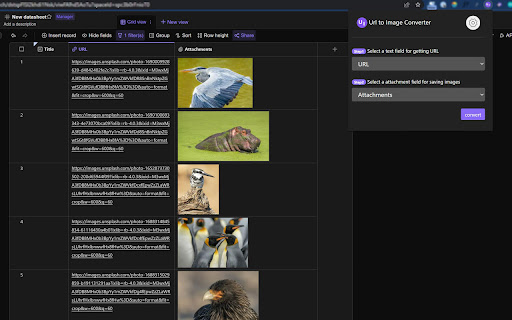
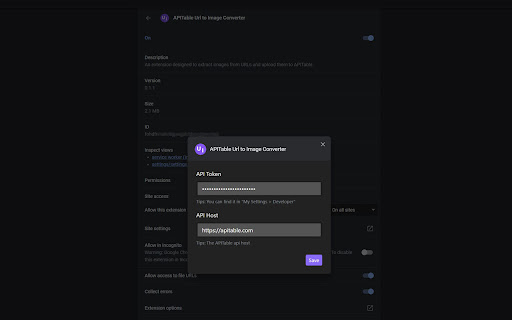
An extension designed to extract images from URLs and upload them to AITable. This is a browser extension that extracts images from URLs and uploads them to AITable or APITable. ● Features ✨ You can extract images from URL addresses and save them to the "Attachment" field. ✨ Supports processing multiple URLs separated by commas (in a single cell), enabling multiple attachments to be saved in the same cell. ● Configuration Before using the extension, follow these steps to set your API access credentials and host information: 1. Open the extension's options page. If you can't find the options page, right-click the extension icon and click button "Options". 2. In the options page, enter your AITable API Token and API Host information. If you don't have an API Token yet, you can register and obtain one on the https://aitable.ai/ 3. Save the settings and return to the extension's pop-up page. ● Usage 1. Visit https://aitable.ai/ and open the datasheet to be processed. 2. Click the icon of this extension to bring up the operation interface. Select which field to read the URL information from and specify which attachment field to save the image data collected from the URL. > Tip 1: URLs must be stored in fields of the following three types: "Single Line Text", "Long Text", and "URL". Other field types will be filtered out and will not appear in the drop-down selection box. > Tip 2: You must first open the aitable.ai datasheet link and then start the browser extension. Otherwise, the extension will be unable to get the field list of the datasheet. 3. After confirming that everything is correct, click the "convert" button, and the extension will begin extracting images and saving to "attachments" field in the background (extension service worker). > Tip: Since this is done in the background, you can close the extension popup window and even the currently active AITable webpage after starting the process. The image extraction and attachment conversion will continue to function normally (but you cannot close the browser...). ● FAQ Q: Can other file formats be extracted and saved to AITable? A: Yes. As long as the URL points to a file that can be directly downloaded by the browser, whether it's a PDF or an mp4, it can be converted using this extension. Q: Some URLs fail to be converted successfully. How can I check the logs or debug? A: Right-click on the extension pop-up window and select "Inspect" from the menu to view the log messages through the console. Or open the console of the service worker to view the background running logs. Q: What's the relationship between AITable and APITable? A: APITable is the community edition of AITable. Extension "Url to Image Converter" works for both of them.

Picture to Text Converter
Use Picture to Text Converter as an image extractor. This app that converts picture to text can turn photo into letter and numbers. Extract the words locked within your pictures and images. Our picture to text converter is the ultimate tool for students, professionals, and anyone in need of a seamless way to turn printed or handwritten notes into text. Stop wasting time with manual retyping and hello to instant, editable content. This intuitive app that converts picture to text will simplify your workflow. Experience the future of data extraction with our powerful image extractor and ai photo reader. ✨ EASY TO USE Our tool makes getting information from a picture a breeze. With a user-friendly interface, you can get started in seconds. It’s the perfect solution for anyone wondering how to convert picture to text without complicated software. 👉 Just select any area of a picture to instantly extract the text. 👉 Let the ai that reads pictures work its magic. 👉 Copy the extracted content with one click. 👉 No registration or login is ever required. 🚀 ULTRA-FAST CONVERSION Time is valuable. That’s why our pictures to text converter is engineered for speed, delivering accurate results in a flash. Whether you need to digitize information or process multiple files, our tool is up to the task. ⚡ Get instant results for any image. ⚡ Boost your productivity significantly. ⚡ No more waiting for slow software. 💡 VERSATILE FUNCTIONALITY This tool is more than just a simple converter; it's a powerful ai image reader designed for a variety of tasks. It's the perfect way to convert a picture to text for any project. ✍️ Effortlessly turn image writing into usable data. ✍️ Ideal for processing a picture with any script. ✍️ A reliable solution to turn photo into letter and numbers. ✍️ Also functions as a handwriting to text converter online. 👨🎓 FOR STUDENTS & EDUCATORS This is the ultimate study companion. Digitize research materials and lecture notes in an instant. Converting picture to text from a book page has never been easier. 🎓 Capture quotes from textbooks or library books. 🎓 Digitize handwritten class notes for easy searching. 🎓 Save whiteboard notes from lectures and presentations. 🎓 Quickly convert a picture of text to text for assignments. 🏢 FOR BUSINESS PROFESSIONALS Streamline your office workflow by eliminating manual data entry. Use our ai image reader to handle all your corporate needs, from meetings to expense reports. 👔 Convert pictures to text from receipts and invoices. 👔 Digitize whiteboard brainstorming sessions instantly. 👔 Extract contact information from business cards. 👔 A perfect tool to convert from picture to text for reports. 🌍 MULTI-LANGUAGE SUPPORT Our ai that can read pictures is not limited to just English. It’s an advanced image to text ai that understands various languages, making it a truly global tool. 🌐 Extract Japanese text from image seamlessly. 🌐 Easily perform image to text chinese conversions. 🌐 Accurately extract arabic text from image. 🧠 AI-POWERED ACCURACY Powered by advanced artificial intelligence, our ai picture reader ensures high accuracy. This ai that can read images is trained to recognize various fonts and even handwriting. 🎯 Get precise words from image files every time. 🎯 Our image reader ai understands complex layouts. 🎯 A reliable ai photo reader and digitization solution. 🎯 Our ai that reads images is always learning and improving. 📄 PDF AND DOCUMENT HANDLING This tool is not just for standard picture files. It also functions as a pdf picture to text converter, allowing you to extract information from your documents with ease. 📎 Seamlessly convert pdf picture to text. 📎 Perfect for digitizing scanned documents and archives. 📎 Convert a picture containing writing to Word formats easily. 📎 An essential pdf picture to text converter for any office. ⚙️ ADVANCED FEATURES We go beyond simple conversions. Our tool includes specialized features for different types of content, making it a versatile picture convert to text solution for complex tasks. 🔶️ Specialized math image to text recognition. 🔶️ Extract every single image letter accurately. 🔶️ Handles various image words and fonts with ease. 🔶️ An excellent image words extractor for any document. ✅ BEST USED FOR To ensure the best experience, please keep the following in mind. This helps you understand the scope of our powerful tool. 📍 This tool processes one image at a time. 📍 An internet connection is required for AI analysis. 📍 Best results are achieved with clear images and pictures.

Extractly (AI Extract Text from Images)
Lightning-fast AI OCR! Extract and translate text from any image, video, or website. Works on YouTube and restricted sites. Stop typing manually! Extractly is your ultimate AI-powered companion for grabbing text from anything on the web images, videos, PDFs, and even restricted sites like YouTube. ⚡️ Whether you're studying, working, or browsing, Extractly saves you time by turning visual content into editable text and translating it in any selected language in a single click. 🔥 Key Features: 🤖 Advanced AI OCR (Tesseract.js (the engine we use) uses LSTM): Powered by neural-network technology to recognize text with incredible accuracy. 🌍 Instant Translation: Translate extracted text into around 100 languages instantly using built-in Chrome AI. ⚡️ Lightning Fast: Persistent engine technology means extractions happen in seconds. 🎥 Video Extraction: Grab subtitles, lyrics, or notes directly from YouTube videos or any streaming content. 🔒 Privacy First: All processing happens locally in your browser. Your data never leaves your device. 📁 History Management: Keep track of your previous extractions with a built-in history log. 🌙 Dark Mode Ready: A beautiful, premium interface that matches your browsing style. 🛠 How to Use: Click the Extractly icon in your toolbar. Select any area on your screen with the selection tool. Magic! Your extracted text appears instantly, ready to be copied or translated. 🌟 Why Extractly? Unlike other extensions that fail on complex sites and all their features are premium, Extractly comes fully free and uses a specialized architecture to bypass CSP restrictions, making it work perfectly on sites like YouTube, Instagram, and LinkedIn. Perfect for students, researchers, developers, and anyone who wants to boost their productivity! Install Extractly today and start extracting like a pro, don't forget to leave a nice 5 stars reveiw!

Converter App Image Converter Extension
Connects your Chrome browser with the converter API and allows you to convert web images to another format from the context menu. This Chrome extension was created after a user request. It connects your browser with the Converter App API and allows you to convert web images to another format from the context menu. This is useful if you want to download an image in a different file format. After you right-click on an image you will see a "Convert Image" entry in the context menu. When clicking it you will be able to choose a target format and the image will be converted directly to this format. When installing the extension you have direct access to the image converting features of Converter App from your browser. The current version of the extension supports the 17 most popular image formats. Works also for modern image formats like AVIF and WebP. More image formats will come with future versions.

Thunt Images Downloader
Dedicated to downloading product detail images from the Thunt.ai website. This extension is a powerful image downloader designed specifically for users of the Thunt website (thunt.ai). If you need to bulk download high-definition product images from Thunt, whether for resource collection, competitive product analysis, or personal archiving, this extension can meet your needs. It helps you easily capture and save all images on Thunt product detail pages, making it a valuable tool for cross-border e-commerce practitioners, designers, and data analysts. Advantages: 1. Download All Images in One Click: With just one click, automatically scan and identify all high-definition original product images on the page, eliminating the tedious task of manually right-clicking and saving each one. 2. Get High-Definition Original Images: Automatically remove thumbnail watermarks and parameters, directly downloading the largest, clearest original image files to ensure image quality. 3. Intelligent Identification and Deduplication: It can penetrate complex page structures, accurately capture dynamically loaded images, and automatically filter out duplicate images, ensuring a clean and tidy download. 4. Easy-to-use interface: Customized specifically for the Thunt website, the interface is simple and intuitive, with all functions clearly visible at a glance. No complex setup is required, and you can use it immediately after installation. Instructions: Step 1: Go to the product details page on any Thunt website. Step 2: Click the extension icon in the upper right corner of your browser to open the downloader window. Step 3: Click the "Scan current page for images" button. Step 4: The extension will automatically list all found high-resolution images. You can select the images you want and click the "Download Selected" button to download them in bulk, or you can download each image individually by clicking the button in the upper right corner. Contact: If you encounter any problems or have feature suggestions during use, please send an email to: 8123202@gmail.com
