
abfimpkhacgimamjbiegeoponlepcbob

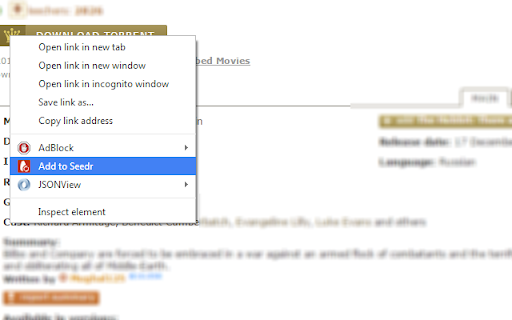
Get Stuff Instantly -- Download and play it anywhere :-) Easily add download links to Seedr (https://www.seedr.cc/) with our Chrome extension! In just one click, send download links to Seedr's cloud download manager and enjoy fast, easy downloads and streaming on any device. No software required – simply paste a link, wait a few seconds, and you're good to go! Get Seedr Chrome Extension for: ✅ Quick & Effortless Downloads ✅ Seamless Streaming on Any Device ✅ No Additional Software Needed Simplify your downloads with Seedr today!

SonicBit
SonicBit Google Chrome Extension. One Click torrent download. Use our extension to simply add torrent to your SonicBit dashboard with single click. Enter any website and right click at the magnet or HTTP/HTTPS torrent link, and simply click 'Add to SonicBit' to download the torrent to your account.

Flipshope: Price Tracker and much more
Automatically find and apply coupon code in a click, get features like Price tracker, price drop alert, recent price drops and more Shop Smarter, Save Better With Price Graph, Coupons, Price Drop & More With Price Tracker By Flipshope! 🛒💸 Why settle for just shopping when you can do SMART SHOPPING! Make the most out of your online shopping with smart features from Flipshope. Track product price history, find the latest coupons, get price drop alerts, and always stay tuned with the best online deals! 1. TRACK PRICES WITH EASE 📈 Check product price history with clear, easy-to-read price graphs. With our price history checker you’ll know exactly when it’s the best time to buy and avoid overpaying during fake sales. No more missing amazing Amazon deals with our Amazon price tracker. Tired of missing deals? Get instant notifications whenever your favourite product’s price drops, so you never miss a chance to save. 3. FIND & APPLY THE BEST COUPONS AUTOMATICALLY 🤑 No need to waste time searching for coupon codes. Automatically find and apply the best coupon available when you check out to always get the best deal. Save more with coupons on Myntra with the built-in Myntra price tracker. Save all your favourite products from different websites in one place. Shop on your terms and easily track prices for everything you’ve saved. 5. BROWSE THE BEST DEALS 🔥 Browse and shop from the best deals with the highest discounts from all your favourite stores bundled right in one place. Make the most out of Flipkart sales with Flipshop’s Flipkart price tracker. Download now and enjoy hassle-free savings with the price history of every purchase. Shop smarter, save better with Flipshope – the best price history tracker. Stop guessing and start saving! The Privacy Policy can also be found here: https://flipshope.com/extension-privacy-policy By installing the extension, you agree to the Terms & Conditions: https://flipshope.com/terms Disclaimer: When you make a purchase through links on our extension or its services, we may earn an affiliate commission at no additional cost to you. Ad Transparency: The extension may display sponsored content or ads to help keep it free and support ongoing development. Users can turn off ads anytime in the extension settings.

Debrid-Link
Downloader & Seedbox. Premium link generator and torrent downloader. The Debrid-Link extension allow you to easily and fastly download or watch files from +150 supported hosts without using our website. - Detect all supported links on the page - Right click on a link or magnet to quickly Download or Stream - Display notifications when you download torrents to send them on the Seedbox - List recent generated files and your torrents on the Seedbox - Copy generated links in the clipboard - Replace embed player - Streaming HTML5 for any files. Chromecast & Airplay support - Fully configurable An account is required to use this extension. Use a premium account to access all hosts and features. https://debrid-link.com

.torrent to Transmission
Automagically add, access and control torrents with Chrome. Automagically integrates the Transmission BitTorrent client with the Chrome browser in the least intrusive way possible. - Right click to add any link to Transmission - Including magnet links - Now works with private trackers - check the options page - Provides a user interface built right into Chrome that allows you to manage your torrents - See your current torrents - divided up into all, downloading, seeding and paused - Manage your torrents: - Pause, remove and move individual torrents up and down the queue - Pause and remove groups of torrents - Enable/disable turtle mode - Provides a quick link to the Transmission built in web interface *** Setup *** - Enable the Transmission Web UI - Open up Transmission - Goto Edit -> Preference and select the Web tab - Make sure the Enable web client box is checked - Enter .torrent to Transmission settings - Open up the .torrent to Transmission options page - Enter the correct RPC address and correct WebUI address - RPC address will take the format of http://:9091/transmission/rpc - WebUI address will take the format of http://:9091 - Make sure to replce with the IP address running the Transmission client Massive update for manifest v3 and changes to Chrome Extension APIs. Please report any bugs encountered. 1.0.0 - Popup will show an error page if unable to communicate with Transmission RPC - Added support for private torrent files/trackers. There is now an item in the options page for downloading the .torrent file and sending the data to Transmission 0.5.9 - Fixed 'Error: undefined' issue in options page when detecting RPC version.
