
abecfjgdgmpdeccfpnmckfliackhcfgc
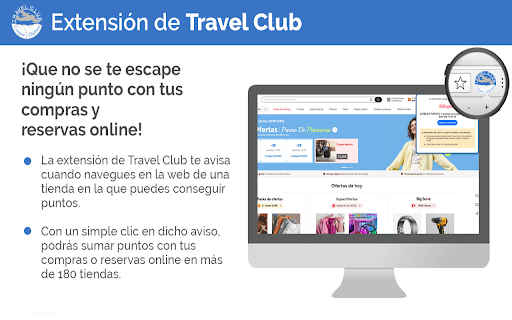


Extensión Travel Club: suma puntos con tus compras y viajes online en más de 200 tiendas con un simple clic. La extensión de Travel Club nos permite ayudarte a conseguir puntos con tus compras y viajes online. Una vez instalada, incluye el número de Tarjeta Travel Club donde quieres sumar puntos y ¡ya está! Cada vez que accedas a una de las más de 200 tiendas online disponibles te avisaremos y con un simple clic en dicho aviso podrás sumar puntos con tus compras o reservas online. ¡Que no se te escape ningún punto con tus compras y reservas online! • Descarga la extensión para tu navegador. • Introduce tu número de Tarjeta Travel Club. • La extensión te avisará cuando estés en una web en la que puedas sumar puntos. • Haz clic en el aviso y compra con normalidad ¡Nosotros te sumaremos los puntos!

vsHotel
Skip the middlemen: check the hotel's direct price while browsing Booking.com. Simply go to Booking.com, select your destination and preferred dates, then click on any hotel. vsHotel will display a small popup with the hotel's website direct price so you can compare it with the Booking one. Disclaimer: vsHotel may get paid affiliate commissions on hotel, rental stays and other items purchased through our links to booking sites, while using this browser extension.

AliAssist: shopping assistant
Search by image on the biggest Chinese marketplace to find the best prices! In China, there are various sellers with different prices and qualities; our extension will help you automate this research so you don't waste hours searching. How to use: 1. Right-click on an image on any website. 2. In the context menu, click "Search by Image." This is the best way to find the best deals and lowest prices when shopping! How it works: This tool will analyze your image with AI (Artificial Intelligence) for visual search, identify the items in the image it finds, and then perform a reverse image search to find visually related and similar products by image. A lightweight and easy-to-use extension for searching for any product you want to buy! AliAssist is a completely free tool, and you will never be charged for using it. However, some links may include affiliate referrals on e-commerce sites such as AliExpress, Amazon, Shopee, and others. This means that if you make a purchase through these links, we may receive a small commission. This does not add any extra cost to you as a user and helps us keep developing and adding features to the extension for free.

Itzuli+
Itzuli+ Extentsioa! Itzulpenak, sintesia eta hiztegia erabiltzeko aukera ematen duen erreminta. Itzulpen-zerbitzuei dagokienez, euskarara edo euskaratik itzultzeko, honako hizkuntza hauek erabiltzeko aukera ematen da: gaztelania, frantsesa eta ingelesa. Itzulpenarekin batera, itzulpena modu esperimentalean entzuteko aukera (sintesia) gehitu da. Hiztegien atalean euskara, gaztelania, ingelesa eta alemana erabiltzeko aukera dago.

AliExpress Coupon Finder
The Chrome extension that finds discounts on AliExpress in autopilot Did you know that most of AliExpress products have hidden discounts or coupons? Every product can have up to six different types of compatible discounts, but finding them and combining can be difficult. Simply install this extension by clicking on "Add to Chrome" and it will do all the hard work: AliCoupons will tell you how to get the best coupons or combinations of coupons for the product you are currently browsing. This Chrome extension will search for available coupons and discounts whilst you are browsing the store. The personal shopping assistant will ensure you save a few dollars and get the best deals every time you make purchase in AliExpress. Just install the extension and on every product page it will automatically start searching for the best coupons and discounts available. When an offer is detected an orange notification will appear with instructions on how to grab it. Let's face it, AliExpress’ coupons and discounts can be a bit confusing and hard to understand, it is for this reason why many people don’t take full advantage of them. However, thanks to this free extension you will be able to save a few dollars on many of your purchases, especially on the products that are in the medium to high price range (there are usually not many discounts or coupons available for extremely cheap products). Extension options: The extension has two modes: the default one is the "Normal Mode", which is intended for individual shoppers, people who normally don’t buy in bulk. In "Normal Mode", notifications will appear automatically in your product page when coupons are available. If you don't see anything, it simply means that there aren't coupons or discounts for that price. The second mode is the "Dropshipper Mode", perfect for wholesale importers and dropshippers who normally need more than one unit. You can enable it from the extension menu in Google Chrome (the one with the coupon icon). This mode will always display the info table and based on the compilation of coupons, wholesale discounts and seller promotions will suggest the optimum quantity of units to purchase to get the most for your money. Why is this useful? Let's say you are about to purchase 8 phone cases at 1$ each, but the extension warns you that there is a 3$ discount when spending 10$ or more: you can add 2 more cases to the cart and the price for 10 units will reduce to 7$. Without the extension, 8 units at 8$; with it, 10 units at 7$. We spent a lot of time developing this new version of the extension and hope you find it useful. We'll certainly be adding new features in the near future. Feel free to send us comments, complaints or suggestions to alicoupons.org@gmail.com Enjoy your shopping! AliCoupons is funded by requesting unclaimed cashbacks, this way you don't have to pay us and still we earn a bit of money to pay the costs of maintaining our service. But if you do use cashback services (programs that give you a small % back from your online purchases such as Letyshops or Megabonus) please right-click on the extension icon, then on "Options", and then activate the Cashback Compatibility mode. This way we'll completely disable our cashback and make sure you receive it all.
