
abcpljfhdegieapcboeabpmfhmdhbooa
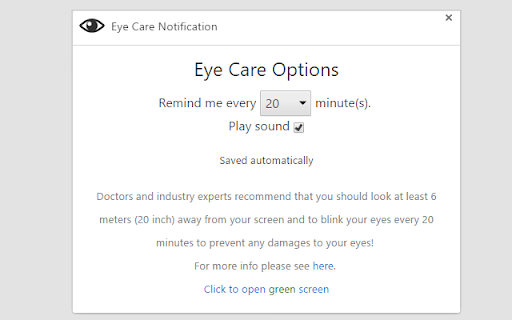

Reminds you to look away from your screen every 20min (customizable). This extension aims to help you through: - reminding you to take a break - providing a green screen to relax The notification interval is configurable. I would advice to let it stay at 20 minutes, as per 20/20/20 rule (Google it). ----- What does this extension do better than others? This extension was created with performance in mind, so there is no unnecessary CPU usage in the background!

Eye Exercises App - Eye Strain & Break Reminder
Take breaks to relax, relieve eye strain, and improve vision with guided exercises and smart notifications. 🖥️ Discomfort from screen time? 🖥️ ❤️ It's time to give yourself the attention you deserve! ❤️ Our reminder helps you relax and improve sight with simple, guided routines. Ideal for computer work, video watching, or reading, it promotes healthy lifestyle. 🌟 Key Features 🌟 ‣ Strain Relief: Movements designed to relieve discomfort from screen use. ‣ Strengthening Training: Targeted workout for good vision. ‣ Guided Routines: Easy-to-follow routines to improve focus and reduce fatigue. ‣ Relaxation Breaks: Guided exercises to rejuvenate your sight. ‣ 20-20-20 Reminders: Prompts to look 20 feet away every 20 minutes for 20 seconds. ◦ Smart Reminders: Personalized reminders for breaks and routines. ◦ Targeted Exercises: Routines designed for tension relief and vision strengthening. ◦ Progress Tracking: Monitor your daily routine and progress. ◦ Customizable Alerts: Adjust notification frequency for breaks. 👁️ Why it matters? 👁️ Modern lifestyles involve extensive screen time, leading to symptoms like: 🔴 Dry eyes 🔴 Blurred vision 🔴 Sight fatigue 🔴 Headaches Our app helps you relax and protect your vision. 🏋️♂️ What is Included? 🏋️♀️ It is a site with guided training to improve vision, prevent strain, and enhance focus. This includes: We provide these workouts in a simple interface for proactive health imporvement. ✅ How to Use? ✅ 1. Set Your Routine: Customize reminders. 2. Take Breaks: Get notified when it's time for a break. 3. Follow Guided Routines: Choose from relaxation and strengthening exercises. 4. Track Progress: Monitor improvements and adjust as needed. ✨ Our Benefits ✨ 🔹 Prevent Digital Eye Strain: Relief from screen time discomfort. 🔹 Improve Your Vision: Enhance focus and reduce fatigue. 🔹 Strengthen Eye Muscles: Build stronger muscles for long-term health. 🔹 Relax Your Eyes: Quick training for refreshment. 🏅 Best Practices 🏅 ✅ Follow the 20-20-20 Rule: Look 20 feet away for 20 seconds every 20 minutes. ✅ Take Regular Breaks: Don’t wait for soreness. ✅ Stay Hydrated: Drink plenty of water. ✅ Adjust Screen Settings: Optimize brightness and use blue light filters. 💡 Why Choose Us? 💡 ➡️ Easy to Use: Simple and user-friendly for all ages. ➡️ All-in-One Solution: Comprehensive workouts and tools. ➡️ Proven Techniques: Uses the 20-20-20 rule and more. ➡️ Customization: Adjust reminders to suit your needs. 🔥 Start Today! 🔥 Improve vision with our product! Install now and start your journey to healthier, stronger you!

PostureMinder
Reminds you to sit up straight with pop-up notifications at specified time intervals. Sitting up straight while at your desk can make a big difference to your posture and overall health. This simple, elegant extension is easily customizable. Set how often you'd like to see a PostureMinder, then sit back and let it do its work! Useful features include: == Easy on/off == Turn off the extension so you don't embarrass yourself during a presentation. == Walk reminders == In addition to sitting up straight, you should also step away from your device every once in a while. Set how often you'd like to see a Walk Reminder. == Snarky == Fun, snarky messages will grab your attention and keep you entertained. ==Sync across devices== Your settings will sync if you have the extension installed across multiple instances of Chrome. Changelog: v2.1.3 Remove closing options as its no longer supported by Chrome. v2.1.0 Add "reload app" button to easily resync notifications. Fix compatibility for Firefox. v 2.0.0 Migrate to Manifest v3 and implement cross-device settings sync. v 1.3.3: Add compatibility for Firefox extensions (Thanks to @wzub for the pull request). v 1.3.2: Fix walk reminder bug v 1.3.1: Fix click close bug and add more phrases. v 1.3.0: Sounds! Optionally play a short notification sound each time your reminder runs. (Thanks to @IvanDonat for the pull request). v 1.2.0: Change enable/disable checkbox to on/off switch. 1.2.1: Small update to make all items fit within the options window nicely. v. 1.1.0: Add options to set the time for Walk Reminders and notification fade. (Thanks to @dee-see for the pull request) Submit feedback, bugs, and feature requests or simply learn more at https://postureminder.app.

Eyes Saver: Screen Timer & Blue Light Filter
Protect your vision & reduce eye strain with the 20-20-20 rule, smart screen timers, blink reminders & a blue light filter. Here is a fresh, modern, and engaging description tailored for the Chrome Web Store. It incorporates your recent feature additions (like the 20-20-20 rule, blue light filter, smart notifications, and pause options) while maintaining the core message of the original description. **Eyes Saver: Protect Your Vision & Reduce Digital Eye Strain** In our increasingly digital world, where screens dominate our daily lives, eye health is of paramount importance. Introducing **Eyes Saver**, the ultimate Chrome extension designed to safeguard your vision, enhance your ocular well-being, and help you build healthier screen habits. Modern lifestyles often lead to extended screen time, resulting in digital eye strain, dryness, and discomfort. Eyes Saver is here to combat these issues by sending gentle, timely reminders that prompt you to blink, look away, and refresh your eyes. Scientifically proven practices like the 20-20-20 rule and frequent blinking help moisten the eyes, reduce fatigue, and maintain focus, making this an essential tool for anyone who spends hours in front of a computer. ⏲️ **The 20-20-20 Rule Mode:** Automatically adopt the golden rule of eye care. Every 20 minutes, take a 20-second break, and look at something 20 feet away. 👁️ **Customizable Blink Reminders:** Tailor Eyes Saver to your specific preferences. Adjust the reminder intervals to every 15 minutes, or set a completely custom timeframe that suits your personal workflow. 🌙 **Integrated Blue Light Filter:** Ease the harsh glare of your screen. Activate the built-in blue light filter to reduce eye strain and improve your sleep quality, especially during late-night browsing. 🤫 **Smart, Subtle Notifications:** Eyes Saver discreetly notifies you when it's time for a break, ensuring minimal disruption. It also features Smart Suppression—automatically pausing notifications when you are idle or watching a video in fullscreen mode. ⏸️ **Flexible Pause Options:** Need absolute focus or giving a presentation? Easily pause reminders for 1 Hour or a full 24 Hours with a single click. 📈 **Track Your Progress:** Monitor your blinking habits and track your eye health improvement over time using Eyes Saver's intuitive, gamified dashboard. Watch your stats grow as you build healthier habits. 📚 **Educational Resources:** Access informative tips and articles straight from the hub on maintaining healthy eyes and reducing digital eye strain. Prioritize your eye health with **Eyes Saver**, the Chrome extension that promotes comfortable, clear, and vibrant vision. Download Eyes Saver today and rediscover the joy of computing with refreshed and revitalized eyes. Say goodbye to eye strain and embrace a brighter, healthier digital future. Your eyes will thank you!

Eye Care
Eliminate eye strain when browsing the internet by taking breaks at regular intervals using the 20-20-20 rule. ++ABOUT EYE CARE++ Screen time is a big issue these days. You probably spend a good number of hours looking at screens, like your computer at work and at home, your smartphone, television, or other digital devices. Looking at screens too much can lead to eye strain. Eye Care, helps solve the problem of eye strain by notifying you to take breaks at regular intervals, and it does this by following the 20-20-20 rule. Thanks for passing by :)
