
abcganhipmjnjcgpeipblkhbdnibeplh
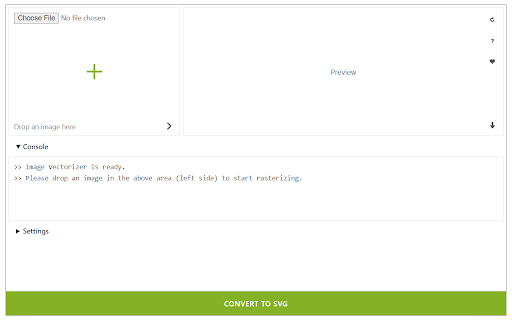

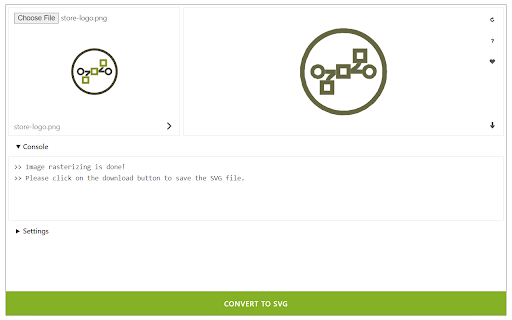
Easily vectorize an image (convert to SVG) in your browser! Image Vectorizer is a browser extension that helps you vectorize any image. It accepts a wide variety of input images including ".png", ".jpg", ".bmp", and many more. Simply drag & drop an image in the addon (top-left corner of the interface) and then click on the - Convert to SVG - button at the bottom. The vectorized image will be rendered at the result box (top-right corner). You can also choose your desired serializing method from the drop-down list within the UI. The pre-set method is the - default - method. There are 15 other methods to choose from the list. There is also a - live preview - checkbox to make the vectorizing process on the fly. As you change any method, the result will be rendered in the top right section without pressing the convert button. Once a rasterizing process is done, the vectorized image will be displayed in the top-right corner with a download button attached to it. Click on this button to download the image to your machine. Please note that the download location is the default download folder in your browser. Note: Dark mode functionality is added in version 0.1.4. Please press the moon icon on the top-right toolbar to switch the theme (Dark | Light). If you have a feature request or found a bug to report, please fill out the bug report form on the addon's homepage (https://mybrowseraddon.com/image-vectorizer.html).

ZapBG
*Remove Backgrounds With The ZapBG Button* ZapBG is your go to solution for background removal when it comes to your images. We specialize in technology that cuts design time and costs when it comes to your images. Whether you're an entrepreneur, small business owner, growth hacker, designer or just looking to be creative, ZapBG has what it takes to deliver background removal demands with ease. Let your creativity and imagination flow with ZapBG and make background removal fun. Get Ready For The ZapBG 2.O Experience - Background Removal Credits - Storage Options - Credit Rollover - Auto Remove Using Advance AI - Sharing Capabilities - Easy Manual Remover - Desktop and Mobile Access - Customer Support - 30 Day Money Back Guarantee - Lifetime Locked in Pricing

Free SVG for Google Chrome™
FREE! This extension quickly preview and fetch all SVG icons from a web page. Download and install this extension today to view and download SVG icons from a website. Preview and download all the SVG icons from a website today. Please ensure you have the permission from the website owner before using any SVG icons which you download from a website. Some artists and graphic designers are kind enough to offer SVG vector icons for personal usage. Please check the license from the website before you use any SVG icons which you download. This software is made possible due to the open source code contributed by Jaques Bouman and Juan Rios Disclaimer: Please note this extension is NOT made by Google and is made by an independent development team. All copyrights belong to their respective owners. Google doesn’t endorse or sponsor this extension. Download SVG Icons for Google Chrome™ is not owned by, is not licensed by and is not a subsidiary of Google Inc.

Text to Image (PNG)
Easily convert text to image (.png) with a custom background image. Text to Image extension enables you to convert any text to an image file. Open the addon's interface, write your desired text, and apply formatting via the top toolbar. You can also add a desired background image or background color to the textarea. Once you are done, please press on the - Convert - button to save the result as a PNG file to your machine. The download path is the default download location on your machine. Please note that, if you resize the addon's interface, the resulting image will be resized as well. This addon uses an opensource library called - html2canvas - to convert an HTML element to image. Please visit this (https://github.com/niklasvh/html2canvas) GitHub repo to get more info about this conversion library. If you have a feature request or found a bug to report, please fill the bug report form on the addon's homepage (https://mybrowseraddon.com/text-to-image.html).

Image Upscaler
Upscale an image using artificial intelligence or a native HTML5 engine in your browser! Image Upscaler is an extension that enables you to upscale an image inside your browser. It uses three different techniques to upscale the input image. The first (and the default) method is using the HTML5 Canvas API to upscale the images up to 10 times the original size. The Canvas API has a built-in interpolation method for pixel smoothing. The final result with the HTML5 method is somehow satisfactory but lacks some details and may not be sharp enough. Two other methods use artificial intelligence for upscaling. The first AI is client-side and uses UpscalerJS (https://github.com/thekevinscott/UpscalerJS) & TensorFlow (https://github.com/tensorflow/tfjs) libraries. The second AI is server-side and uses the ClipDrop API (https://clipdrop.co/apis/docs/super-resolution). Please read the privacy policy for this addon here (https://mybrowseraddon.com/privacy-policy/image-upscaler.html). Note 1: for the canvas method (default engine), the maximum upscale factor is 10x, for the client-side AI it is 8x, and server-side 4x. Note 2: for both AI methods, it is recommended to use small images as the upscaling process with artificial intelligence is computationally expensive. In server-side AI, an API key is needed; please read the instruction within the extension on how to get the API key. If you have a feature request or found a bug to report, please fill out the bug report form on the addon homepage (https://mybrowseraddon.com/image-upscaler.html).
