
abbaenghodbpkiilgjikhnjeepealkpf
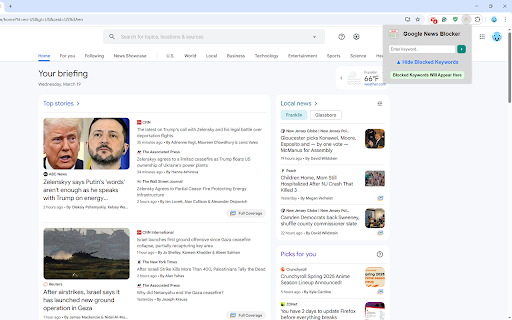


Google News Blocker removes all articles on news.google.com that contain a keyword that you have blocked. This extension serves as an easy way to block any Google News articles on topics you don't want to see. Once installed, clicking on the extension icon will bring up a popup with a textbox for entering keywords to block and a toggle that shows a list of your currently blocked keywords. To add a keyword, type the word in the textbox and then press enter or the + button. Any articles on Google News that contain the keyword will be removed. You can remove blocked keywords by clicking the - button next to it in the list.

News Filter for Google News
A simple Google Chrome extension. 1. Put in the exact name of the author into the text field and hit Confirm. 2. Refresh the page and navigate to https://news.google.com/ to see it in action!

NewsFilter - block what you want to
NewsFilter blocks articles containing the words you choose, helping you filter out unwanted content. NewsFilter is a Chrome extension that helps you maintain a distraction-free browsing experience by automatically filtering out content based on specific keywords you provide. Simply enter the words you want to block, and the extension will hide any links, articles, or pages containing those terms. Blocked content will be replaced with a "Content Hidden" message, so you can stay focused on the information that matters most. Want to go back to normal? Just turn it off. - Automatically filters and blocks content containing keywords you’ve specified. - Replaces blocked content with "Content Hidden" for a focused browsing experience. - Simple setup – just add your keywords and let NewsFilter do the rest. - Equipped with an easy "On / Off" button. Stay in control of your online experience and filter out irrelevant or unwanted content with NewsFilter.

Keyword Blocker
Keyword Blocker automatically closes websites whose URL contains one or more keywords you have blocked. This extension serves as an easy way to block any keywords or websites that you want to avoid. Once installed, clicking on the extension icon will open a popup that lets you enter new block terms and see the lists of your currently blocked keywords and regex patterns. To add a keyword, type the word in the textbox and then press enter or the add button. Any sites that contain the keyword will be closed, and any new sites you try to open that contain it will close immediately. To add a regex pattern, it is the same process, except before pressing enter or the add button, turn on the Block Regex Pattern toggle. Once a keyword or regex pattern has been added, you can make it locked in by pressing the Confirm Button, or remove it with the Remove Button. There is no way to remove a keyword once it has been locked in, this way you don't feel tempted to remove it later on. I personally recommended using Registry Editor to prevent this extension from being removed to secure your blocking even more.

News Guardian
Introducing "NewsGuardian" – Your Personal News Filter Chrome Extension! Are you overwhelmed by the flood of news, tired of sifting through articles that don't interest you, or wish to avoid specific topics that trigger stress or anxiety? "NewsGuardian" is here to transform your browsing experience! With our smart Chrome extension, you can easily block out news articles containing certain words or phrases, ensuring your news feed is tailored just for you. "NewsGuardian" empowers you to customize your news consumption like never before. Whether it's avoiding spoilers for your favorite series, bypassing distressing news topics, or simply focusing on content that matters to you, "NewsGuardian" has got you covered. Our intuitive interface allows you to set up filters in seconds – just type in the words or phrases you want to avoid, and voilà, a personalized news oasis awaits! But that's not all – "NewsGuardian" is designed with your peace of mind at the forefront. It works quietly in the background, updating your filters in real-time, so you can browse with confidence, knowing you'll only see content that's right for you. Say goodbye to unwanted news and hello to a more enjoyable online experience with "NewsGuardian" – your gatekeeper in the digital world.
