
ababhhiegjhaohnipcgjfgfeljakfhhc
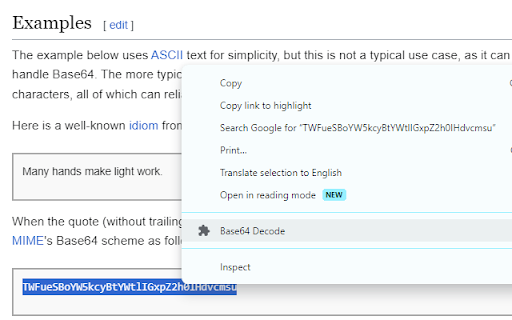
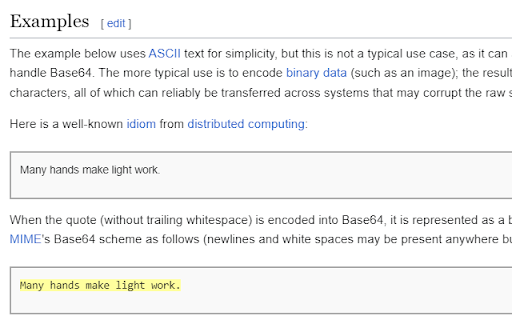
Decodes Base64 strings. Highlight the string and right-click. This is a tiny extension that does just one thing: Decodes Base64 strings. To use, simply highlight the string you wish to decode, right-click it, and select 'Base64 Decode'. Note: depending on the structure of the page, decoding the string may cause some funny formatting issues. Refresh the page to restore structure/formatting. This plugin runs 100% locally in your browser, no data is collected or transmitted in any way.

K-Twitch-Bypass
Extension to bypass Twitch quality restrictions

Cheese Knife - CHZZK Toolkit
Adds useful features and tools to CHZZK. This extension adds various useful features and tools to CHZZK, NAVER's streaming platform. [Explore] - Live Preview: Preview live by hovering over the channel. - Refresh Sidebar: Refresh the sidebar every 30 seconds. - Popup Player: View multiple lives in one window. [Player] - Stats Menu: Select Stats from the right-click menu to view resolution, bitrate, FPS, latency, and codec. - Seek with Arrow Keys: Use the arrow keys to rewind a short amount of time. - Video Filters: Adjust video brightness, contrast, and gamma, and apply a sharpen filter. - Audio Compressor: Reduce loud sounds to adjust the dynamic range to make the sound more comfortable. [Chat] - Hide Donation Messages: Hide Cheese messages in the chat. - Adjust chat panel and font size It also adds many other useful features and allows to customize styles. ==== This extension is not affiliated with CHZZK, and related trademarks are the property of their respective owners. This extension is provided "as-is" without any warranties, and the developer assumes no responsibility for any issues, damages, or data loss resulting from its use.

DIBE
Dcinside Integrated Broadcast Environment ● 게시물 목록 자동 갱신 - 자동 갱신 기능은 현재 탭에서 3초 간격부터 제공됩니다. (최소화 상태나 게시물 내부에서는 작동하지 않음.) ● 게시물 새 탭에서 열기 ● 게시물 시간 정보 표시 ● 비고정닉 ID 표시 ● 글꼴 변경 ● 다크모드 ● 향상된 게시글 목록 탐색 ● 통신사 IP 차단 - 통신사 IP 대역을 차단합니다. - 통신사 IP 차단 활성화 상태에서 차단 IP 'mblck' 값 삭제 시 오류가 발생하므로 유의바랍니다. ● IP 대역 정보 표시 - 국내 : 초록 / 모바일 : 파랑 / 프록시 및 해외 : 빨강 - 디시질질 데이터를 기반으로 일부 대역 수정. 문제 시 삭제. - 일부 대역 정보에 오류가 있을 수 있습니다. ● 차단 게시물 숨기기 - 디시인사이드 자체 차단설정 게시물을 보이지 않도록 처리할 수 있습니다. - 이제 자동 갱신과 중복사용이 가능합니다. - 이제 차단 게시물 숨기기 설정이 강제됩니다.

DragFree (Mouse Unblock+Char Count+Image Save+Capture)
Restores mouse drag, right-click, and image save on blocked sites. Adds bulk image save, char counter, and page capture. If you've ever felt frustrated by being unable to select text or right-click on news articles, blogs, study materials, or shopping pages, try **DragFree**. * **Unblock Restrictions:** Enable mouse dragging, right-clicking, text selection, copying, and pasting. * **"Auto" Mode:** Automatically unlocks restrictions on every website you visit. * **"Manual" Mode:** Unlock only when needed by clicking the [Unlock] button or using a shortcut. * **View Text:** View the page's HTML/text in a new tab (extracts content even within iframes). * **Batch Image Save:** Download all images from a page at once. * **4 Capture Modes:** Current screen, Select area, Select element, and Full scroll page. * **Built-in Word Counter:** Easily check the character count of any text. * **"Manual" Mode (Recommended)** Click the [Unlock] button on the desired page or press the shortcut (**Alt+1**) to instantly remove restrictions. * **"Auto" Mode** Automatically removes restrictions on all sites. If a specific site does not function correctly, use the "Register Current Domain" button to add it to the **Exceptions List**. * **Text View Pro-Tip** For sites with advanced protection where right-click cannot be enabled, use **[View Text]** to extract and view the content in a new tab. * **Image Saving / Screen Capture** requires "Download" permission. Please refresh the page once after granting permission. * You can manage or revoke granted permissions at any time via the `chrome://extensions` page.
