
aamgpllamglhegglhogmfejmeihmnkpb


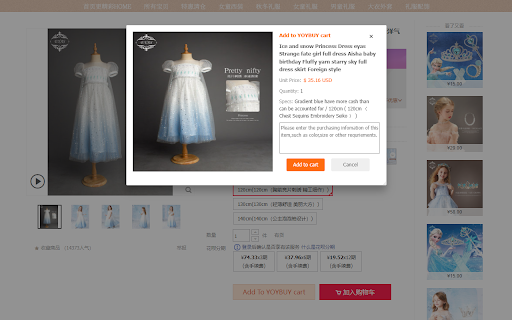

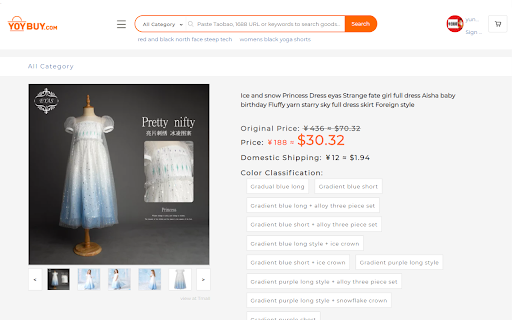
YOYBUY Taobao Extension help you to add items from Taobao.com, Tmall.com and 1688.com to taobao agent: YOYBUY.com YOYBUY Taobao/Tmall/1688 Shopping extension is tailored to assistant YOYBUY customers to add items to YOYBUY Shopping cart easily while browsing Taobao,Tmall and 1688. YOYBUY.com, established in 2008, is a leading company which offers one stop Shopping Agent service to purchase and ship Chinese products for global users. Over 50,000,000 items have been purchased and more than 1,000,000 parcels shipped for the past 10 years.

AiPrice(AliPrice) Sourcing Tool Beta
AiPrice Sourcing Tool allows you to easily find the source goods on e-commerce websites. Key Features: 1. Search by Image - The most comprehensive image search tool on the web, supporting e-commerce platforms like Amazon, AliExpress, Alibaba, and Taobao. For more platforms, please visit the AiPrice official website: https://www.aiprice.com - Image Search Methods: Click the AiPrice icon above the product image; right-click and select Screenshot Search; upload a local image to search. - Image Zoom: On the product list page, hover your mouse over an image to zoom in. 2. Utility Toolbar - Download Images: Batch download product images and videos from Taobao, Amazon, Pinduoduo, and other sites; export image links; translate text on images; and enlarge images in HD. - Copy Links: One-click copy of product links from Alibaba, Taobao, etc. When copying long links, the selected product SKU is included, and it will automatically display when you open the link again. - Copy Titles: Copy product titles and use translated titles to search for similar products on Taobao. - Shipping Fee Checker: Instantly check shipping costs for different regions. - Export All Store Products: Export all items from a store into an Excel file. - SKU Viewer & Price Calculator: View all SKU details of AliExpress products with one click. 3. Price History and Order History - View the price history of products on platforms like AliExpress, and Amazon for free, helping users distinguish genuine discounts from fake ones. Users can add products to their favorites and receive notifications when prices drop. - Trends: View the one-year price and order history of products on platforms like Amazon. 4. Translation - Aliwangwang Translation: Translate conversations with sellers in both the source and target languages for seamless communication. - Web Translation: Right-click to translate an entire webpage. - Screenshot Translation: Right-click to take a screenshot and translate the text within it. 5. Product Related - Advanced Search: Includes features like comparing similar products, filtering and sorting, and exporting data to Excel, helping users more accurately find the products they need. - Product Information PRO: Display extra details on product listings such as shipping cost, order price, minimum order quantity, annual sales, listing time, and store opening date. 6. Review Relevance - Review Analysis: Analyzes the country distribution of reviewers on AliExpress product details. - Download Reviews: Download product reviews and images from Amazon and AliExpress. 7. Currency Converter - Displays prices on Taobao converted to dozens of foreign currencies, including US dollars and Korean won. - Displays prices in RMB on websites like Temu, Amazon, and Alibaba International. 8. Logistics Monitoring - View parcel tracking details directly on the order list pages of Taobao. 9. Copy Search Suggestions - Copy suggested and related keywords from Amazon and other platforms’ search boxes. 10. Export Shopping Cart - Export products from your Taobao shopping cart to an Excel file. 11. Browsing History - View your browsing history on, Taobao, AliExpress, and other websites in the lower-left toolbar. 12. Highlight Ad Tags - Highlight “AD” tags to clearly distinguish sponsored products. 13. Minimize Plugin - Collapse or expand the plugin window in the lower-left corner. By installing the AiPrice plugin, you agree to the AiPrice Terms of Service and consent to the plugin redirecting you to advertising links, including those on platforms like Ali: https://www.aiprice.com/information/index?page=term_of_use If you have any questions or suggestions, please feel free to contact us. https://www.aiprice.com/information/index?page=contact

Taobao Tmall Data Scraper - Sales,Product
Taobao Tmall Data Scraper -Product,Sales: This chrome extension allows you to extract the webpage details of Taobao.com and Tmall.com into an editable excel format. You can now use this extension to extract the product list of your competitor, brand, products in any product specification, customer review of specific product. 1. Go to Taobao.com or Tmall.com 2. Type any keywords in the search bar or select the desired product categories such as, brand name, product keywords...etc 3. Use the filtering option to fine tune the search results and click enter 4. Once show up the search results, open the chrome extension and click start. The data will be extracted in excel format if you sync the data. What you benefit from this product : - Competitor analysis : Extract the whole product list, sales rank and pricing information in excel format for further analysis - Online retail arbitrage : Extract the product specification of the lowest price product in excel and list to other marketplace. e.g. Extrac the Taobao.com and Tmall.com product date and list to Amazon platforms via Amazon inventory loader or using third-party listing tools to upload to Shopify, big-commerce, ebay..etc - Know your customer : Extract the customer review of specific products - Market research : Understand how many resellers and competitors selling the same products and in the same market - Unauthorized sales channel monitoring : By extracting the product and listing information, you can easy to identify which sellers list below reseller price, so as to identify the potential reseller that engage parallel import or counterfeit products What data you can extract : - Product specification - Price - Seller price and details - ASIN - Sales rank - Product image - Customer review Exception : - Due to huge data extraction process, the browser may be downed due to the computer run out of ram. This recommends to extract less than 1000 data each time - The extension may hang or exceptional loading time is required depending on the volume of data We welcome any comments or ideas to enhance the products. Please contact : mailto:hello@datasunday.com

AiPrice(AliPrice) Price Tracker for China import
Track the price history of products on Alibaba for the past 3 or 6 months and receive price drop alerts AiPrice(AliPrice) China Import Assistant is an all-in-one tool for eCommerce sellers that integrates Alibaba price tracking, product research, reverse image search, supplier comparison, and image downloading. It helps users efficiently complete product analysis, cost control, and supplier sourcing, improving efficiency for Alibaba sourcing and China product research. Main features: 1. Alibaba Price History View 3-month or 6-month price history charts directly on the product page to analyze price trends, identify the best purchasing timing, and optimize cost and profit margins. Ideal for price monitoring, market analysis, and supplier price comparison (Alibaba price tracker / price history tool). 2. Price Change Alerts Add products to your favorites list, and the system will send notifications when prices increase or decrease (email notifications supported), helping you capture the best purchasing or selling opportunities (price drop alert / price monitoring). 3. Reverse Image Search Use image search to find identical or similar products across multiple platforms, quickly discover lower-cost suppliers or more sourcing options, and improve China sourcing efficiency and product research (reverse image search / product matching / China sourcing). 4. Product Image Download Download Alibaba product images with one click for product data organization, market research, and secondary editing, improving operational efficiency. 5. Quick Access Tool A convenient popup entry is available in the upper-right corner of the browser, allowing fast access to commonly used features and improving daily workflow efficiency. 6. Quick Product Link Copy Copy product links with one click for easy team collaboration, product sharing, and supplier communication. Suitable for: Alibaba.com sellers Cross-border eCommerce buyers and sourcing specialists Dropshipping sellers China sourcing and product research professionals Users who need Alibaba product research, price tracking, supplier comparison, and 1688 sourcing tools By installing the AiPrice(AliPrice) extension, you agree to the AiPrice(AliPrice) Terms of Service and acknowledge that the extension may redirect to promotional links, including Ali-related platforms: https://www.aiprice.com/information/index?page=term_of_use If you have any questions or suggestions, please feel free to contact us. https://www.aiprice.com/information/index?page=contact

AiPrice(AliPrice) Search by Image for TB
AiPrice Search by Image allows you to easily find the source goods on e-commerce websites. Key Features: 1. Search by Image - The most comprehensive image search tool on the web, supporting e-commerce platforms like Taobao, 1688, Amazon, AliExpress, etc. For more platforms, please visit the AiPrice(AliPrice) official website: https://www.aiprice.com - Image Search Methods: Click the AiPrice(AliPrice) icon above the product image; right-click and select Screenshot Search; upload a local image to search. - Image Zoom: On the product list page, hover your mouse over an image to zoom in. 2. Utility Toolbar - Download Images: Batch download product images and videos from Taobao, Amazon, Pinduoduo, and other sites; export image links; translate text on images; and enlarge images in HD. - Copy Links: One-click copy of product links from Alibaba, Taobao, etc. When copying long links, the selected product SKU is included, and it will automatically display when you open the link again. - Copy Titles: Copy product titles and use translated titles to search for similar products on Taobao. - Shipping Fee Checker: Instantly check shipping costs for different regions. - Export All Store Products: Export all items from a store into an Excel file. - SKU Viewer & Price Calculator: View all SKU details of AliExpress products with one click. 3. Price History and Order History - View the price history of products on platforms like AliExpress, and Amazon for free, helping users distinguish genuine discounts from fake ones. Users can add products to their favorites and receive notifications when prices drop. - Trends: View the one-year price and order history of products on platforms like Amazon. 4. Translation - Aliwangwang Translation: Translate conversations with sellers in both the source and target languages for seamless communication. - Web Translation: Right-click to translate an entire webpage. - Screenshot Translation: Right-click to take a screenshot and translate the text within it. 5. Product Related - Advanced Search: Includes features like comparing similar products, filtering and sorting, and exporting data to Excel, helping users more accurately find the products they need. - Product Information PRO: Display extra details on product listings such as shipping cost, order price, minimum order quantity, annual sales, listing time, and store opening date. 6. Review Relevance - Review Analysis: Analyzes the country distribution of reviewers on AliExpress product details. - Download Reviews: Download product reviews and images from Amazon and AliExpress. 7. Currency Converter - Displays prices on Taobao converted to dozens of foreign currencies, including US dollars and Korean won. - Displays prices in RMB on websites like Temu, Amazon, and Alibaba International. 8. Logistics Monitoring - View parcel tracking details directly on the order list pages of Taobao. 9. Copy Search Suggestions - Copy suggested and related keywords from Amazon and other platforms’ search boxes. 10. Export Shopping Cart - Export products from your Taobao shopping cart to an Excel file. 11. Browsing History - View your browsing history on, Taobao, AliExpress, and other websites in the lower-left toolbar. 12. Highlight Ad Tags - Highlight “AD” tags to clearly distinguish sponsored products. 13. Minimize Plugin - Collapse or expand the plugin window in the lower-left corner. By installing the AiPrice(AliPrice) plugin, you agree to the AiPrice(AliPrice) Terms of Service and consent to the plugin redirecting you to advertising links, including those on platforms like Ali: https://www.aiprice.com/information/index?page=term_of_use If you have any questions or suggestions, please feel free to contact us. https://www.aiprice.com/information/index?page=contact
