
aahnibhpidkdaeaplfdogejgoajkjgob
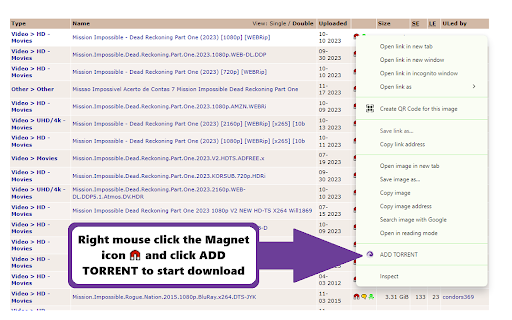

Send Link to Bittorent For Chrome Send a link to BitTorrent Web UI and BitTorrent PC UI with one click. The BitTorrent extension allows you to send links directly to the BitTorrent UI without leaving the current page, enabling instant downloads of torrents or magnet links into a customizable set of directories within BitTorrent. We aim to enhance the environmental friendliness of our extension. As part of our efforts, we provide you with the opportunity to engage in carbon offsetting at no cost, as it is 100% supported by our affiliate partners. This is an optional feature, allowing you to decide whether you'd like to participate during the onboarding process.

BitTorrent For Chrome - Classic
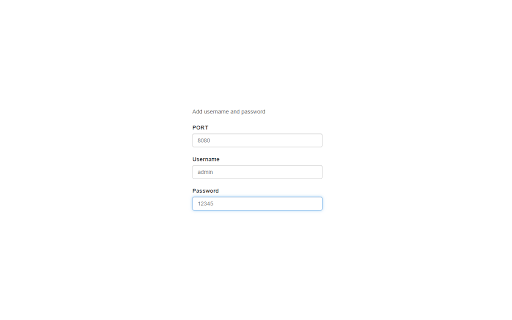
Seamlessly send magnet links and torrent files directly to your BitTorrent Classic client from Chrome. BitTorrent For Chrome - Classic: The Ultimate Torrent & Magnet Link Integration Take full control of your downloads with BitTorrent For Chrome - Classic. This extension bridges the gap between your browser and your BitTorrent Classic client, allowing you to send magnet links and .torrent files directly to your desktop downloader with a single click. No more copying and pasting links or manually downloading files. Our seamless integration module works silently in the background, making your torrent management faster, smarter, and more efficient. 🚀 KEY FEATURES: - One-Click Magnet Link Capture: Send magnet links directly to BitTorrent Web UI. - Manual Link Support: Paste links manually into the popup for instant downloading. - Right-Click Integration: Context menu support for adding torrents from any website. - Real-Time Connection Test: Verify your Web UI settings instantly within the options page. - Universal Multi-Language Support: Full localization in 50+ languages for a global experience. - Modern & Minimal Design: User-friendly interface designed for speed and clarity. 🛠️ EASY SETUP GUIDE: 1. Open your BitTorrent Classic client. 2. Go to Options > Preferences > Advanced > Web UI. 3. Check "Enable Web UI" and set a username/password. 4. Check "Alternative listening port" and set it (default is 8080). 5. Open our extension options and enter the same credentials. Why Choose BitTorrent For Chrome - Classic? Our extension is designed for users who value productivity. Whether you are managing multiple downloads or just want a quicker way to start a single torrent, this tool is the perfect companion for your BitTorrent client. It is lightweight, secure, and focused on providing the best possible user experience.

Shake Torrent
Are you tired of the hassle of downloading separate software to manage your torrents? Say goodbye to the old ways and embrace the future with Shake Torrent, the cutting-edge WebTorrent client designed to revolutionize your file-sharing experience right within your web browser! 1. Seamlessly Seed and Download Files: Shake Torrent allows you to effortlessly seed and download torrents directly from your browser. No more cumbersome installations or resource-heavy applications. Enjoy the simplicity and convenience of accessing your favorite content without leaving your browser window. 2. Lightning-Fast Streaming: Experience lightning-fast streaming of videos and audio files with Shake Torrent's advanced WebTorrent technology. Say goodbye to buffering issues and enjoy uninterrupted entertainment without any delays. 3. User-Friendly Interface: Our intuitive and user-friendly interface makes managing torrents a breeze. Whether you're a seasoned torrent enthusiast or a newcomer, Shake Torrent welcomes users of all levels, offering a smooth and delightful experience. 4. Robust File Management: Shake Torrent empowers you to efficiently organize and manage your downloaded files. Easily categorize, search, and sort your content, making it a breeze to find what you need when you need it. 5. Instant Preview: Preview your files before downloading them with Shake Torrent's instant preview feature. No more wasting time on unwanted downloads - ensure you get exactly what you're looking for! 6. Secure and Private: Your privacy matters to us. Shake Torrent ensures your data remains secure and private during the entire torrenting process. Rest easy knowing your personal information is in safe hands. 7. Cross-Platform Compatibility: Access Shake Torrent from any device with a web browser. Whether you're using a desktop computer, laptop, tablet, or smartphone, enjoy seamless cross-platform compatibility. Install Shake Torrent from the Chrome Web Store. Open the Shake Torrent extension within your Chrome browser. Search for torrents or add magnet links. Enjoy fast and reliable downloads or stream media files on the go. Seamlessly manage your torrents and files with our easy-to-use interface. Embrace the Future of Torrenting: Shake Torrent brings a new era of torrent management, merging the power of WebTorrent technology with the convenience of browser-based access. Embrace the future of file-sharing and take control of your torrenting experience like never before. Note: Shake Torrent is intended for legal and authorized use only. Respect copyright laws and abide by the terms of service of the content you access through the application.

Remote Torrent Adder
This extension allows you to send torrent files from your browser to your remote or local Bittorrent client's web interface. It doesn't just send the urls to the WebUIs, but downloads the torrent and uses the file upload function of the UIs to add the torrent. Thus, it even works on private trackers that require cookies. Currently, it supports several web interfaces, a full list can be viewed on the project page. Per default, this extension scans any open page for links that match given filters and overwrites the download-action, but its functionality can also be accessed via a context menu. Its filters are easily extensible using regular expressions via the options page, but a basic set of filters should work for most sites. For faq, support (issues) or the latest changes, please visit the GitHub page that is linked in the "DETAILS" tab of this page.

.torrent to Transmission
Automagically add, access and control torrents with Chrome. Automagically integrates the Transmission BitTorrent client with the Chrome browser in the least intrusive way possible. - Right click to add any link to Transmission - Including magnet links - Now works with private trackers - check the options page - Provides a user interface built right into Chrome that allows you to manage your torrents - See your current torrents - divided up into all, downloading, seeding and paused - Manage your torrents: - Pause, remove and move individual torrents up and down the queue - Pause and remove groups of torrents - Enable/disable turtle mode - Provides a quick link to the Transmission built in web interface *** Setup *** - Enable the Transmission Web UI - Open up Transmission - Goto Edit -> Preference and select the Web tab - Make sure the Enable web client box is checked - Enter .torrent to Transmission settings - Open up the .torrent to Transmission options page - Enter the correct RPC address and correct WebUI address - RPC address will take the format of http://:9091/transmission/rpc - WebUI address will take the format of http://:9091 - Make sure to replce with the IP address running the Transmission client Massive update for manifest v3 and changes to Chrome Extension APIs. Please report any bugs encountered. 1.0.0 - Popup will show an error page if unable to communicate with Transmission RPC - Added support for private torrent files/trackers. There is now an item in the options page for downloading the .torrent file and sending the data to Transmission 0.5.9 - Fixed 'Error: undefined' issue in options page when detecting RPC version.
