
aahmokcapgbidmfkfgigfkecioalgncp
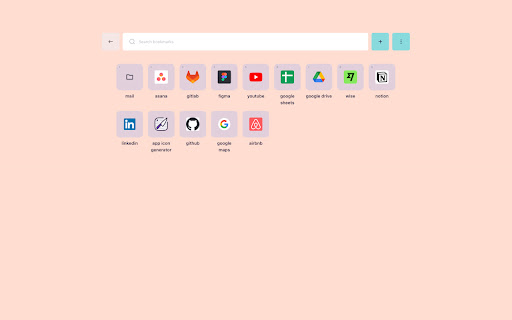
Replacing a new tab with visualized bookmarks. 🖼 See your Chrome bookmarks as beautiful tiles on every new tab 🔀 Reorder bookmarks 🔍 Search across all bookmarks 🎨 Personalize bookmarks with custom logos 🌓 Dark and light theme support ⌨️ Navigate with keyboard shortcuts ⚡️ Enjoy lightning-fast experience

Tabliss - A Beautiful New Tab
A beautiful New Tab page with many customisable backgrounds and widgets that does not require any permissions. Transform your new tab page to something beautiful and yours. Tabliss offers hundreds of customisation options to create a new tab page that unique to you. Choose from many background providers, and be rewarded with stunning, new pictures every time you open a new tab. Add your favourite widgets to stay productive throughout your day. Create your own new tab experience. We care about your privacy and your experience. Tabliss is private, fast, and free. Completely free alternative to extensions like Momentum. FEATURES - Hundreds of customisation options - Millions of backgrounds - Useful widgets that keep you productive - Translations for over 40 languages - Private, secure, and requires no permissions - Settings sync between your devices - 100% free and open source BACKGROUNDS - Millions of photos with Unsplash - Millions of animated gifs with GIPHY - Solid colours and colour gradients - Upload images from your own device WIDGETS - Current time in: analogue, digital, or quotes from literature - Personal greetings that change over the course of the day - Real-time weather conditions - Inspiring daily quotes (or not inspiring, there are categories) - Todo list to keep track for tasks - Quick notes to jot things down - Quick links/speed dial for your favourite websites - Search box with support for Google, DuckDuckGo, and more - Work hours to count down the day - Live NBA scores for live games - GitHub contributions calendar - IP information about your connection - Custom CSS for advanced styling

New Tab from Webdoka
Customize your new tab with visual bookmarks. Webdoka New Tab transforms a blank Chrome New Tab shortcut into a useful start page with visual bookmarks and saved page fragments. Instead of a static Google new tab page, you get a clean dashboard with clips, links and snapshots that you collect while browsing. Use the web page clipper built into the extension whenever you find something worth saving. Select an area, save a visual bookmark and return to this exact place later in one click. The clip keeps a preview and a direct link, so your chrome web clipper becomes a fast way to remember ideas, articles and tools. ✨ What you can do with this extension 1️⃣ Turn the standard Chrome New Tab page into a personal start screen with visual bookmarks 2️⃣ Pin your clips with the extension and open them like bookmarks with a single click 3️⃣ Organize saved content from different websites in one Chrome New Tab page 4️⃣ Create your own Chrome new tab default page without heavy widgets or news feeds ➤ Key features of the web clipper • Capture page fragments instead of full screenshots • Save previews with page title, link, date and clipped area • Use web clipper on any site • Find clips quickly from the Chrome New Tab page • Keep all data locally on your device 🧭 Why use a custom new tab extension Many users keep dozens of open tabs because they are afraid to lose information. Webdoka: New Tab helps turn this chaos into a structured new tab page. This approach works better than long bookmark folders. You see a visual grid, not a list of titles that are hard to decode months later. Each visual bookmark works as a reminder of what you wanted to read, compare or buy later • chrome new tab shortcut opens a board with all important clips • web clipper extension helps you save the right part of the page, not the whole site • start page serves as an index of all visual bookmarks 1. Save parts of long articles and research reports 2. Clip sections of product pages to compare prices or specs 3. Capture fragments of design, interface or layout for inspiration 4. Highlight webpage areas with key numbers or diagrams and save them as cards 5. Store ideas for future tasks, purchases and projects on the custom new tab Each clip behaves like a compact document. You open a start page, glance at the grid, and instantly remember why this page was important. 🛠 How the chrome extension web clipper works • After installing the extension, set it as your default new tab page to make it work automatically • You can capture a page fragment in three ways: open the extension popup and choose “Clip area”, click the floating “W” button on the right side of the page, or simply press Alt + S • Select the area you want to capture, and the clip will be saved automatically • Click any card to open the original content in a separate tab You no longer need separate tools for screen capture or saving bookmarks — the extension combines both in one clean workflow. The web clipper part of the extension is built for speed, while the custom new tab page focuses on clarity. Together they create a lightweight way to organize scattered information without relying on heavy productivity tools. The extension keeps the interface minimal. No complex widgets, news, weather or distracting elements. Only: • a clean new tab page chrome layout with your clips • simple controls to open, delete or reorder cards Install the extension, open a new tab and try clipping a few important fragments from your favorite sites. In a couple of days the Chrome New Tab page will turn into a living board of ideas, tasks, research and plans. You will spend less time searching through history and more time using the information you already saved. Made with love ❤️

Studylib New Tab - Startpage with flashcards
Replace new tab page with a personal dashboard featuring flashcards learning. New Tab page that gives you an ability to learn something new during your working day with spaced repetition technique (the most powerful technique in existence for improving your brain's ability to recall what you study). You can learn languages, math, chemistry, computer science and everything you want. Join our users and get inspired to create the life you want to live. • Flashcards reviewing • New inspirational photo each day • Pop-Up translator • Links and search • Customize the dashboard by showing/hiding widgets This extension shows you a stream of flashcards each time a new tab is opened. That way, every time you open a new tab you review 2-3-5 cards before doing something else, mixing these tiny chunks of flashcards reviewing through the day, which should also improve memory-retention as interleaving comes into play. It is a part of the Studylib.net project. So you can review your sets of flashcards not only with this extension but using a website with your PC or mobile device.

Empty New Tab Page
With this extension, new tabs display a blank page instead of the usual new tab page with thumbnails. For those who don't want to worry which recently visited pages show up on the new tab page, who prefer plain over noisy, simple over complex. Version 1.3.0's only change is to use manifest_version 3. For this extension, this does not affect behavior at all. The change is required to keep the extension listed in Chrome Web Store.
