
aaejjbgblhooaocjbgbodmadopcdfleb
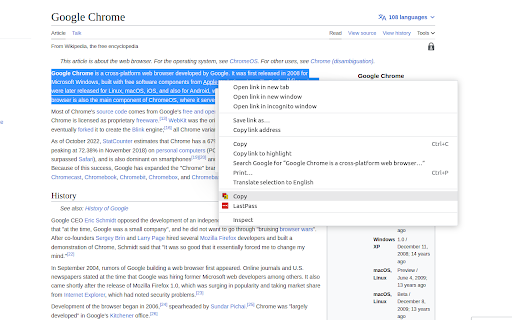

Copy multiple texts, concatenate then and paste. EcuaEloy Multicopy is Handsome-appearance Chrome Extension for efficient copying and pasting of multiple texts. With this powerful extension, you can bid farewell to the tedious task of copying and pasting one snippet at a time. MultiCopyPaste simplifies your workflow by enabling you to copy multiple pieces of text and store them in a clipboard manager. As you come across various texts across different web pages or applications, simply copy them one after another. The extension intelligently saves each copied text in its memory, preserving your clipboard history. When you're ready to paste your collected texts, EcuaEloy Multicopy provides a seamless experience. A single click on the extension's icon reveals a convenient clipboard history panel, displaying all the texts you copied. From there, you can effortlessly select and paste multiple texts into any input field or text editor, streamlining your work and saving valuable time.

FACT wallet
The Ultimate Gateway to the ImFACT Network. FACT Wallet is your most flexible and secure access point to the ImFACT Network. Acting as a bridge between your digital assets and real-world data, FACT Wallet brings the convenience of blockchain to you anywhere. 🔐 Complete Security Your private keys are fully protected and accessible only to you. FACT Wallet ensures the highest level of security so that your assets are safe all the times. 😆 Easy Management Manage your cryptocurrencies and NFTs in a seamless way. Our intuitive interface makes it easy to send and receive tokens without the hassle of copying long addresses every time. Save frequently used addresses with fun nicknames and emojis, and transfer tokens with just one click. 💻 Comprehensive Support for DApps Dive into the diverse services of the ImFACT Network with ease. FACT Wallet supports a wide range of DApps, providing you with a versatile and integrated experience. With FACT Wallet, blockchain is not just a technology; it’s a seamless part of your daily life. Experience the best of ImFACT’s services with the security and convenience you deserve. 🔗

Session Switcher
A Chrome extension for switching between sessions Session Switcher is a browser extension that allows users to manage, save, and switch between multiple login sessions with ease. It's especially useful for developers, testers, or anyone who frequently switches between accounts or environments. 🔐 Save Login Sessions Capture and store cookies for the current session. 🔄 Switch Between Sessions Instantly Load saved sessions with one click — no more logging in/out manually. 💾 Persistent Storage All session data is stored locally and securely in your browser. 🌐 Multi-Site Support Manage sessions for different websites independently.

Modulr Wallet
A secure browser wallet for managing blockchain accounts and signing transactions on the Modulr network. Modulr Wallet is a secure, non-custodial browser wallet for the Modulr blockchain. It allows users to create and manage multiple accounts, securely store private keys using encrypted local storage, and send transactions directly from the browser. The wallet supports account import and export, session-based unlocking, and a full-screen dashboard experience. Private keys never leave the user’s device, and no analytics or tracking are used. Modulr Wallet is designed for users who want a simple, secure way to interact with the Modulr blockchain and web-based applications.

MultiCopy Clipboard, Copy & Paste
MultiCopy Clipboard — Your Ultimate Clipboard Manager for Chrome Copy unlimited text, organize everything, and never lose a snippet again. MultiCopy transforms your browser into a powerful clipboard manager that remembers everything you copy—even after closing Chrome. Whether you're a developer gathering code snippets, a researcher collecting quotes, or anyone who copies and pastes throughout the day, MultiCopy keeps all your text safe, searchable, and instantly accessible. ✨ COMPLETELY REDESIGNED INTERFACE Fresh, modern design that's beautiful and intuitive. A cleaner look with improved usability. 🏷️ SMART TAGGING SYSTEM Organize your copies with custom tags. Add labels like "work", "code", or "links" to categorize and find your snippets instantly. 📌 PIN YOUR FAVORITES Keep your most-used text at the top. Pinned copies stay accessible so you never have to scroll for important snippets. 🔍 INSTANT SEARCH Find any copy in milliseconds. Search through text content and tags with real-time filtering. 🔗 SOURCE TRACKING See where your text came from. MultiCopy automatically saves the source URL and page title with each copy. ⚡ BLAZING-FAST STORAGE Powered by IndexedDB for lightning performance. Store thousands of copies without limits or slowdowns. • Alt + C — Instantly add selected text to MultiCopy • Alt + V — Paste all your copies at once • Right-click menu — Quick copy & paste options ━━━━━━━━━━━━━━━━━━━━━━━━━━━━━━━━━━━━━━━━ 💾 NEVER LOSE YOUR COPIES ━━━━━━━━━━━━━━━━━━━━━━━━━━━━━━━━━━━━━━━━ All your copies are automatically backed up in Chrome's local storage. Close MultiCopy, close Chrome, restart your computer—your clipboard history is always there when you need it. Start copying smarter today. Install MultiCopy and take control of your clipboard! While MultiCopy stores your copies locally on your device, data loss can occasionally occur due to factors outside our control—such as browser updates, clearing browser data, system crashes, or hardware failures. MultiCopy is not responsible for any lost data. For important information, we recommend keeping separate backups.
