
aadbccnfhppdlnleiebemjlbnehbecpj
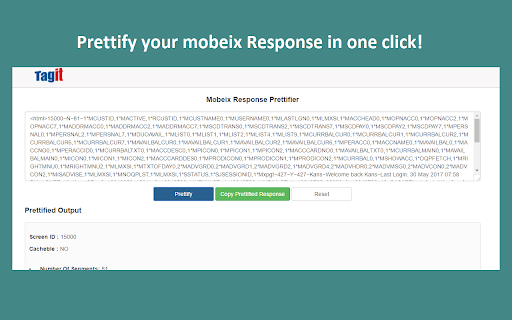

Chrome Extension to Beautify Mobeix Response Prettify conveniently – Use Prettify buttons for formatting the Mobeix response string. Copy and paste conveniently – Use Copy Prettified Response buttons for copying the complete response in one click.

PromptSync
Ask ChatGPT, Bard AI, and Bing Chat with one single prompt! Unlock the power of four dynamic chat platforms with a single prompt! Introducing PromptSync, your all-in-one solution for chatting with ChatGPT, Bard AI, and Bing Chat, through a convenient Chrome extension. Multi-Platform Chat Engage in conversations effortlessly with ChatGPT, Bard AI, and Bing Chat from a single prompt. Get diverse perspectives and responses to your queries. Customizable Experience Tailor your chat experience to your liking! Enable or disable individual chat platforms according to your preferences through the settings menu. Efficient Workflow Streamline your workflow by accessing multiple chat services without switching tabs. Save time and stay productive as you harness the combined intelligence of four powerful chat systems.

Web3 Wizard Helper
Extension to simplify querying and data hacking on Dune Analytics IMPORTANT NOTE The extension does not work anymore due to breaking changes in Dune API. Unfortunately I don't have enough time and motivation to support it since very few people were using it and I don't make anything from it nor use Dune anymore. It is open source so you can fix it yourself if necessary. I am open for any kind of work or collaboration – please contact me by email. Thank you! This extension is for you to speed up querying on Dune Analytics. It helps you to get Dune tables preview and structure in a second, WITHOUT: – Navigating in the data explorer (left panel). – Making mock selects (SELECT * FROM ... LIMIT 10) to see table structure. How to use in Dune SQL editor: – Put cursor on table name and press Ctrl-s to see Dune table's structure (click column name to copy). – Put cursor on table name and press Ctrl-p to preview Dune table. 🥳🥳🥳

Mouse Highlight & Annotation Tool
Highlight your cursor and draw temporary annotations on any webpage. Perfect for presentations, demos, and screen sharing. Quick Start 1️⃣ Click “Add to Chrome” 2️⃣ Use the popup buttons to activate Cursor Highlight and Temporary Drawing tools 3️⃣ Draw and highlight effortlessly with annotations that fade away in 1 second — no clutter, no permanent marks Key Features 🎯 Cursor Highlight: A purple circular overlay follows your mouse cursor across all websites to help you point out key elements during live demos or screen sharing. ⌛ Temporary Drawing Tool: Draw with a forest green pen that automatically fades your annotations after 1 second — perfect for quick, ephemeral markup without leaving traces. 🔄 Activate or deactivate anytime via popup buttons for fast, seamless control 💡 Minimal & lightweight: Designed to stay out of your way and not slow down your browser 🔐 Privacy-focused: No data collection or tracking; everything runs locally in your browser Why Use Mouse Highlight & Annotation Tool? Whether you're a teacher, presenter, UX reviewer, or remote worker, this tool helps you communicate visually without cluttering your screen. Use it to: Direct attention during live presentations or screen shares Highlight important points smoothly with a visible cursor overlay Keep your workflow clean and distraction-free Permissions This extension requires minimal permissions — it runs entirely in your browser without accessing your data or sending information externally. Customizable cursor and pen colors Additional shortcut options for even faster activation 📌 Do my annotations stay on the page permanently? No. All drawings automatically fade out after 1 second, keeping your browsing clean. 📌 Is this extension safe and private? Absolutely. It runs locally and does not collect or send any user data. 📌 How do I activate the features? Simply open the popup and click the buttons to activate or deactivate the cursor highlight and drawing tools. Boost your presentations, screen shares, and live demos with Mouse Highlight & Annotation Tool. Add it to Chrome today and start communicating visually — cleanly and effortlessly!

The Big Gift List
Easily add items to your 'The Big Gift List' lists Help friends and family take the guesswork out of buying you gifts with The Big Gift List. When it comes to a birthday, Christmas, wedding or any other special occasion, with your gift list you can show your friends and family what you really want, so they don't need to guess. Use the official browser extension to add items to your gift lists directly from any website.
